Mezzanine debt, also called mezzanine financing, is a type of financing that got its name due to the fact that it’s a debt-equity hybrid.
Mezzanine financing gives the lender the ability to convert to an equity interest in the company in the case of a default, which makes it a frequent option during acquisitions and buyouts.
While as a type of debt it has the highest risk, high mezzanine loan interest rates also offer the highest potential returns for lenders, though with flexible repayment terms for borrowers.
Is a mezzanine loan debt or equity?
Mezzanine loans are a hybrid of both debt and equity, which can make them a bit a difficult at first to understand.
The best way to understand them is that they’re a form of debt financing that has equity options built in, which allows it to take on the form of an equity investment if those options are exercised.
Mezzanine debt isn’t commonly used, as roughly only about 10% of debt is mezzanine debt, and therefore it’s often considered lower priority than senior debts. However, its unique qualities make it a useful option in the right situation.
How does Mezzanine debt work?
Mezzanine debt creates a new level of flexibility for borrowers and lenders that otherwise wouldn’t be possible.
Mezzanine lending is often sought-after as an aid to companies with specific acquisition goals. Mezzanine lenders also tend to be long-time investors in the company, making them a trusted partner to make those projects a reality.
Mezzanine loans often have a few unique qualities, including:
As opposed to traditional bank loans, mezzanine loans typically have a higher return than senior debt and are often unsecured
Mezzanine debt is subordinate to senior debt but higher priority than pure equity
There is no principle amortization
A portion of the return on a mezzanine loan is fixed, differing from pure equity
Explaining mezzanine financing can be a bit confusing even with a thorough explanation, so let’s look at an example.
Mezzanine financing: Example
Bill is looking to purchase a company worth $10 million, so he goes to a lender he’s hoping will finance the purchase.
Bill isn’t approved for the full amount, but he gets $5 million toward the purchase. To bridge the gap and get the remainder of the financing he needs to make the purchase, he looks to get mezzanine financing.
He acquires mezzanine financing for $4 million, making his direct investment just $1. That breaks down to:
$5 million basic loan
$4 million mezzanine loan
$1 personal investment
On the repayment side, the mezzanine lender then charges a 16% interest rate as opposed to just 6% with the bank loan. However, as opposed to paying interest charges monthly or annually, Bill has the option to add those charges to the cost of his loan, giving him added flexibility.
Pros and Cons of mezzanine debt financing
With a more thorough explanation of what mezzanine debt is, let’s talk about why you might want to consider using mezzanine debt as well as the drawbacks of doing so.
Mezzanine financing has the unique ability to offer lenders a way of obtaining equity in a business, something no other type of debt financing can do. It can have a considerable impact on a lender’s rate-of-return in some cases.
However, it’s not without its cons for both lenders and borrowers. Here’s a breakdown of both the pros and cons of mezzanine debt for lenders as well as borrowers:
Pros and Cons for borrowers
The greatest pros exist in what mezzanine financing can do for borrowers. However, mezzanine loans offer their own cons as well.
Pro: Leverage
A mezzanine loan offers borrowers financing they otherwise wouldn’t have been able to acquire, giving them more purchasing power and the ability to earn a higher return on equity optimal cases.
Pro: Looks better on your balance sheet
Because mezzanine financing often appears as equity on a company’s balance sheet, it makes your debt level appear lower than it is, making it easier for you to qualify for financing.
Pro: Tax-deductible interest
Interest payments on a mezzanine loan are typically tax-deductible, which can account for a large amount of savings over the course of a year.
Pro: Flexible repayment options
Repayment options with mezzanine debt are often highly flexible, with the ability to add interest charges to your loan’s balance or even pay those charges with cash.
Con: Using a mezzanine loan for purchasing leverage is risky
While mezzanine loans have unique benefits for borrowers, they also come with their own set of cons. The primary con of mezzanine loans doesn’t inherently exist in the loan itself but in the way they’re typically used.
Using a mezzanine loan for purchasing leverage comes with a high level of risk. There’s no guarantee the company is going to be a success, or even break even on your investment, so that loan may become a significant debt.
Con: Equity interest
If you as the borrower default on a mezzanine loan, you could be required to provide equity interests to lenders.
Pros and Cons for lenders
The pros and cons of mezzanine loans for lenders are more direct and typical as they relate to lending, but they’re significant nonetheless.
Pro: Equity benefits
There are just a few pros of mezzanine lending, but they’re significant.
First, lenders can potentially gain equity, giving them the ability to take advantage of the growth of a business and the resulting equity.
Pro: Interest income
Another pro is that mezzanine loans typically have very high interest rates, which gives mezzanine financing a high potential return.
Con: Subordinate debt
Because mezzanine debt is considered subordinate to pure debt, a mezzanine debt from a lender may not be secured by any hard collateral.
If a business defaults, by the time all senior debt is paid, there may be no more collateral or cash-equivalent to pay repay the loan.
A unique type of financing
Mezzanine financing is entirely unique among the wide-ranging collection of business financing solutions.
It serves an important role that other financing vehicles can’t fill, making it a useful tool for both lenders and borrowers.
Asked to connect your bank account through DecisionLogic before a loan can move forward? It is reasonable to want to know who will see your information and what happens after you connect.
DecisionLogic is a bank-verification and financial-data platform used by lenders and other institutions. With your permission, it helps the requesting company review account information and activity. It does not lend you money or approve your application.
Some institutions we work with use DecisionLogic, and we help facilitate their bank-verification requests. This guide explains both the merchant’s steps and the institution’s review.
The right login depends on why you are here. A borrower completing a verification request follows a different path from an employee signing in to an institution’s account.
Borrowers and merchants
Open the verification link sent by your lender or the institution handling your application. Check who requested it, read the permissions, then follow the bank connection prompts.
Missing or expired link? Ask the requesting institution for a replacement. DecisionLogic’s FAQ says its support team cannot send you a new lender request link.
Use the official DecisionLogic portal with the account credentials assigned to you by your institution. These are separate from a merchant’s online-banking credentials.
This button leaves Excel Capital and opens DecisionLogic.
Search results also include an unrelated restaurant-management product called Decision Logic. Check that you are using the bank-verification provider at decisionlogic.com. For request-link guidance, see DecisionLogic’s borrower FAQ.
Decision Logic loans: what the verification means for your application
“Decision Logic loans” usually means loans offered by institutions that use DecisionLogic during their review. There is no single DecisionLogic loan product, interest rate or approval requirement. The lender or funding provider sets those terms.
For a business owner, a verification request may help an institution check the account associated with an application, review available transaction history and understand how money moves through the business. DecisionLogic describes these uses in its business-lending materials.
A bank balance is only a snapshot. An underwriter may also consider recurring receipts, payment obligations, seasonal changes and low-balance periods. A large deposit could be sales revenue, a transfer between accounts or proceeds from another financing agreement. Those distinctions matter when assessing the business’s ability to make payments.
What types of lenders use DecisionLogic?
The platform serves different institutions, including business lenders, consumer lenders and equipment-finance providers. A provider’s use of DecisionLogic does not tell you whether it offers the financing you need or whether you qualify. Confirm the provider’s identity, products and terms directly before applying.
If you are comparing small business loans or a business line of credit, focus first on the amount needed, repayment schedule, total cost and the business’s cash flow. The bank-verification platform is one part of that process.
How do you pass DecisionLogic bank verification?
First, separate completing the bank connection from qualifying for financing. To complete verification, use the correct request, connect the account the institution asked for, and finish your bank’s authentication prompts. If the connection fails, use the troubleshooting steps below.
For the lending review, ask the institution which records it needs and be ready to explain transfers, unusual deposits, existing payments or missing activity. There is no universal DecisionLogic minimum balance, overdraft limit or passing score that guarantees a loan. Any financing requirements come from the institution reviewing your application.
Does completing DecisionLogic mean you are approved?
No. A successful connection means the verification step completed. The institution still needs to review the information, resolve any questions and make its decision. Contact that institution for approval status, funding timing or an explanation of an offer. DecisionLogic cannot provide those answers for it.
If a different institution requests a new verification, do not assume an earlier link covers the new application. Ask which business account and request you should use.
How does DecisionLogic bank verification work?
The basic exchange is straightforward: the institution requests information, you authorize the connection, and the institution receives a report. The exact screens and available records depend on the bank connection and the products the institution has enabled.
From verification request to application review
Two participants, with different responsibilities at each stage.
1
Institution sends the request
A lender or other institution supplies a link associated with your application.
2
Merchant checks the request
Confirm the sender and read what information the connection will share.
3
Merchant connects the bank
Follow the authentication prompts and any bank security challenge.
4
Verification completes
Look for the completion message and follow the return instructions.
5
Institution reviews the report
The reviewer checks available account data and follows up on missing context.
6
Institution gives the next step
Application review, an additional request or a funding decision comes from the institution.
How to complete DecisionLogic as a merchant or borrower
Before starting, have access to the online banking for the account the institution requested. If your business has several accounts, ask whether it needs the operating account, a deposit account or more than one account. Connecting the wrong account can lead to another request.
Your checklist before and after connecting
Before you begin
Confirm the request with your known contact if it is unexpected.
Check that you can sign in to your bank directly.
Have your bank’s authentication device or phone available.
Read the permission and account-selection screens.
Before you close the window
Complete any bank security prompts within the connection flow.
Check for a success message or instructions to try again.
Return to the requesting institution for application updates.
Keep the institution’s contact details for follow-up questions.
Never email or text your online-banking password to a representative.
Follow the request through the connection screens
Open the institution’s link. If the request does not match an application you recognize, verify it through a contact method you already trust.
Find your financial institution. Choose the bank and the correct online-banking connection, including a business-banking option when applicable.
Authenticate and review permissions. Follow the prompts presented for your bank. A supported connection may take you to your bank’s own sign-in or authorization screen. Complete any multi-factor authentication there.
Select the requested account when prompted. Review the account details rather than choosing the first account automatically.
Finish and return to the institution. A success screen confirms the connection step. Ask your contact whether anything else is needed for the application.
The examples below come from DecisionLogic’s published walkthrough, reviewed October 17, 2026. They are the provider’s screen examples in device mockups, not a live customer application. Your bank, connection method and institution may show different screens. Select an image to see it larger.
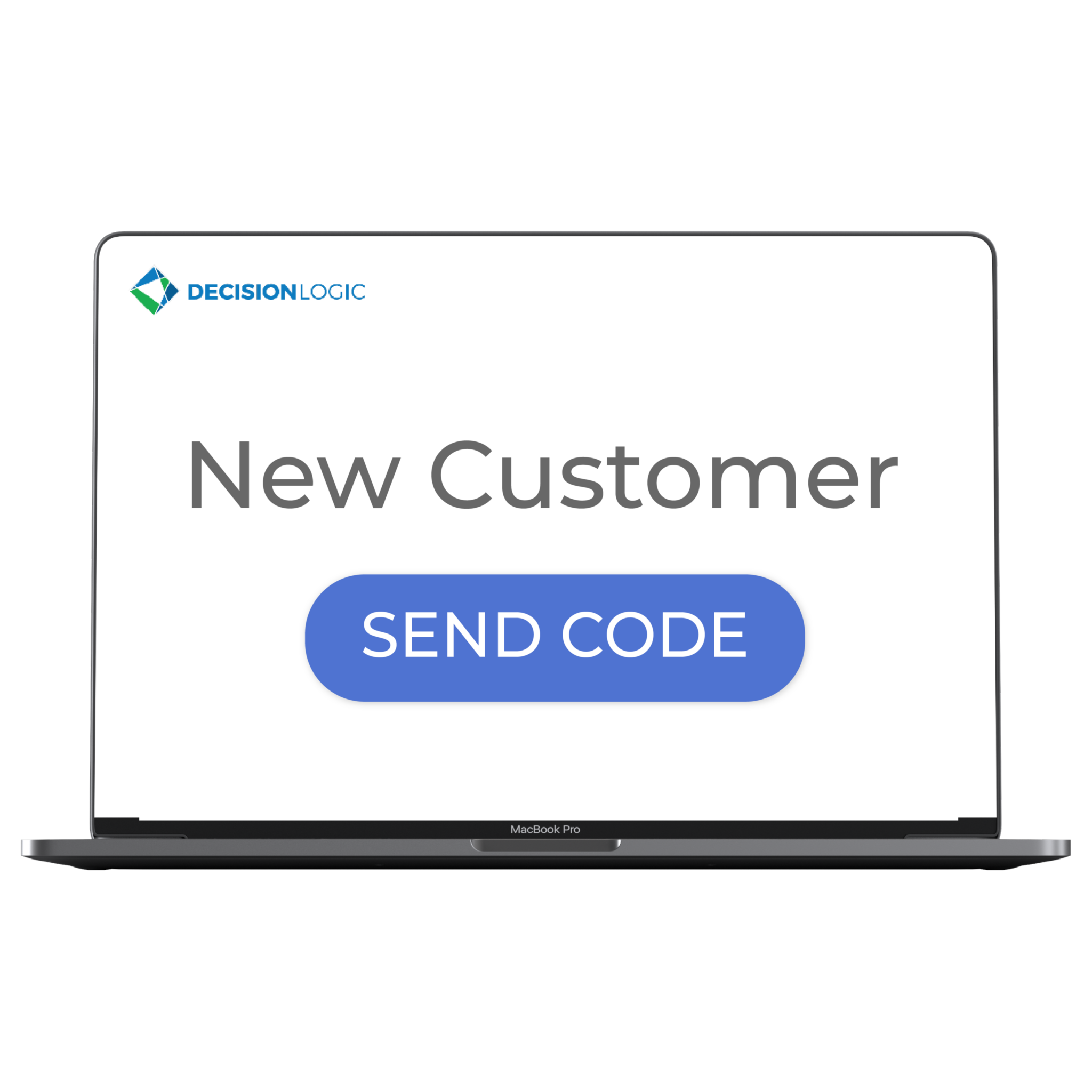
1. The institution sends the request
The provider’s example shows the institution starting a new customer request. The merchant receives the corresponding link by text message or email.
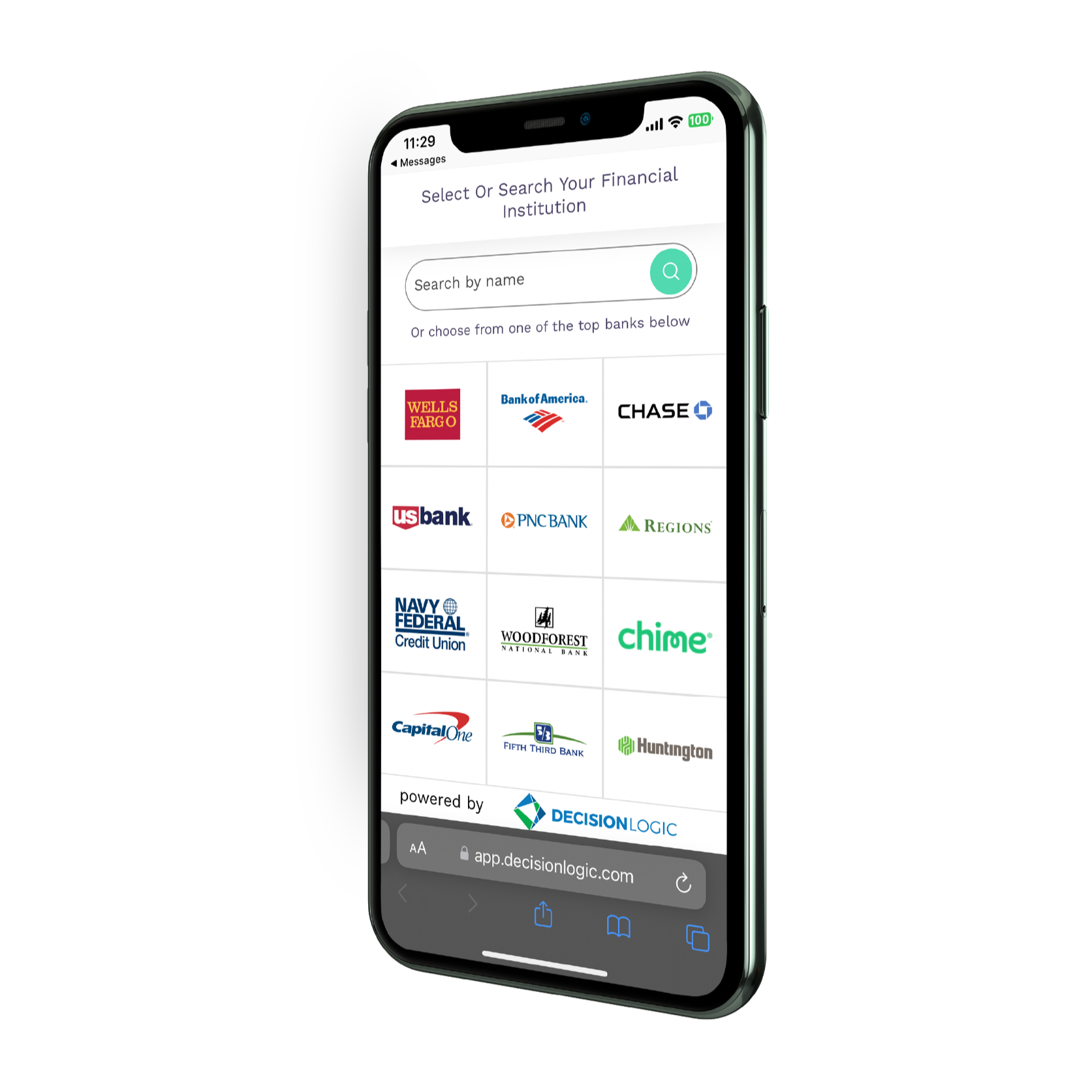
2. The merchant selects the bank
This published screen shows bank selection. Continue through the authentication and permission steps shown for your bank.
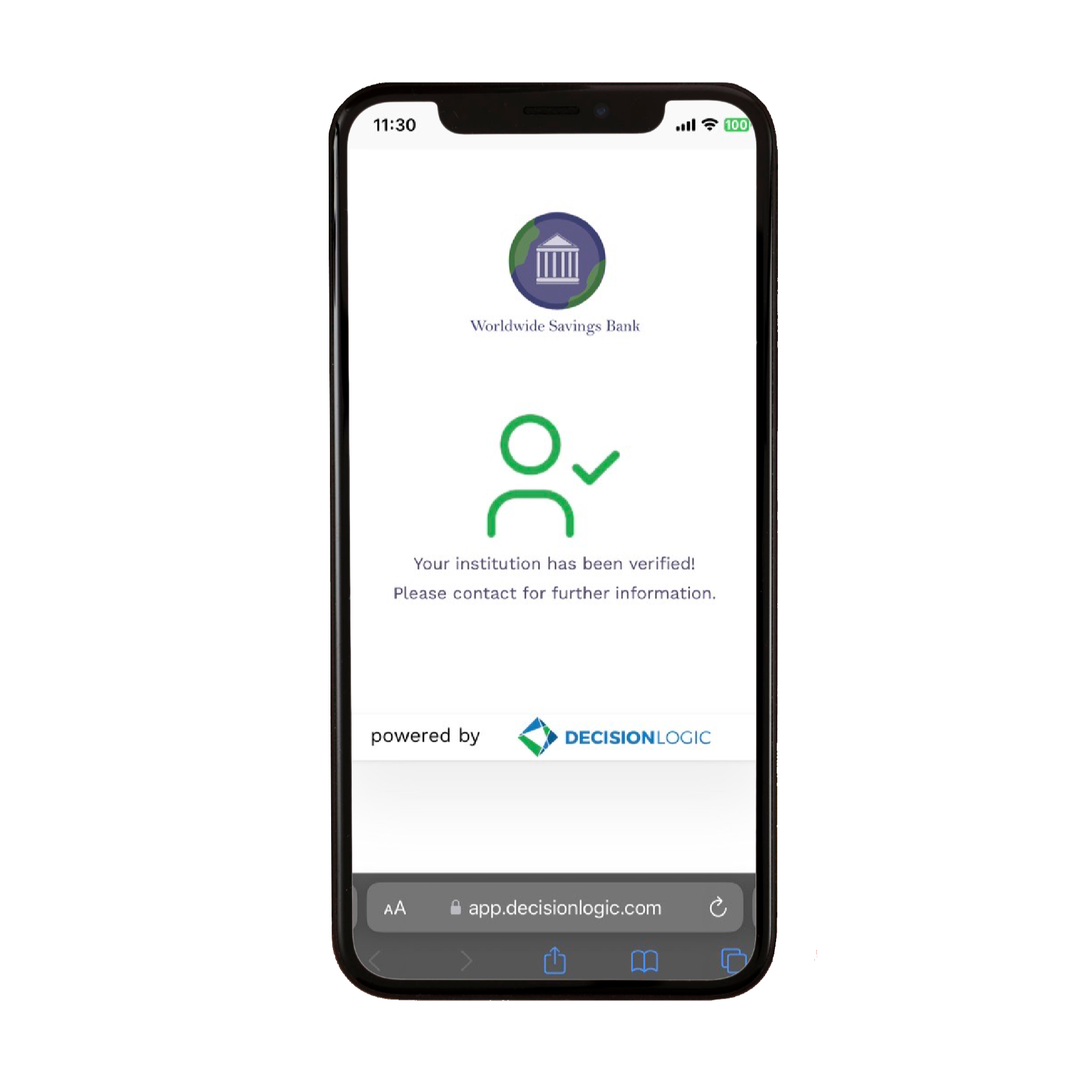
3. The merchant receives confirmation
The completion message concerns bank verification. It does not confirm that a loan has been approved or funded.
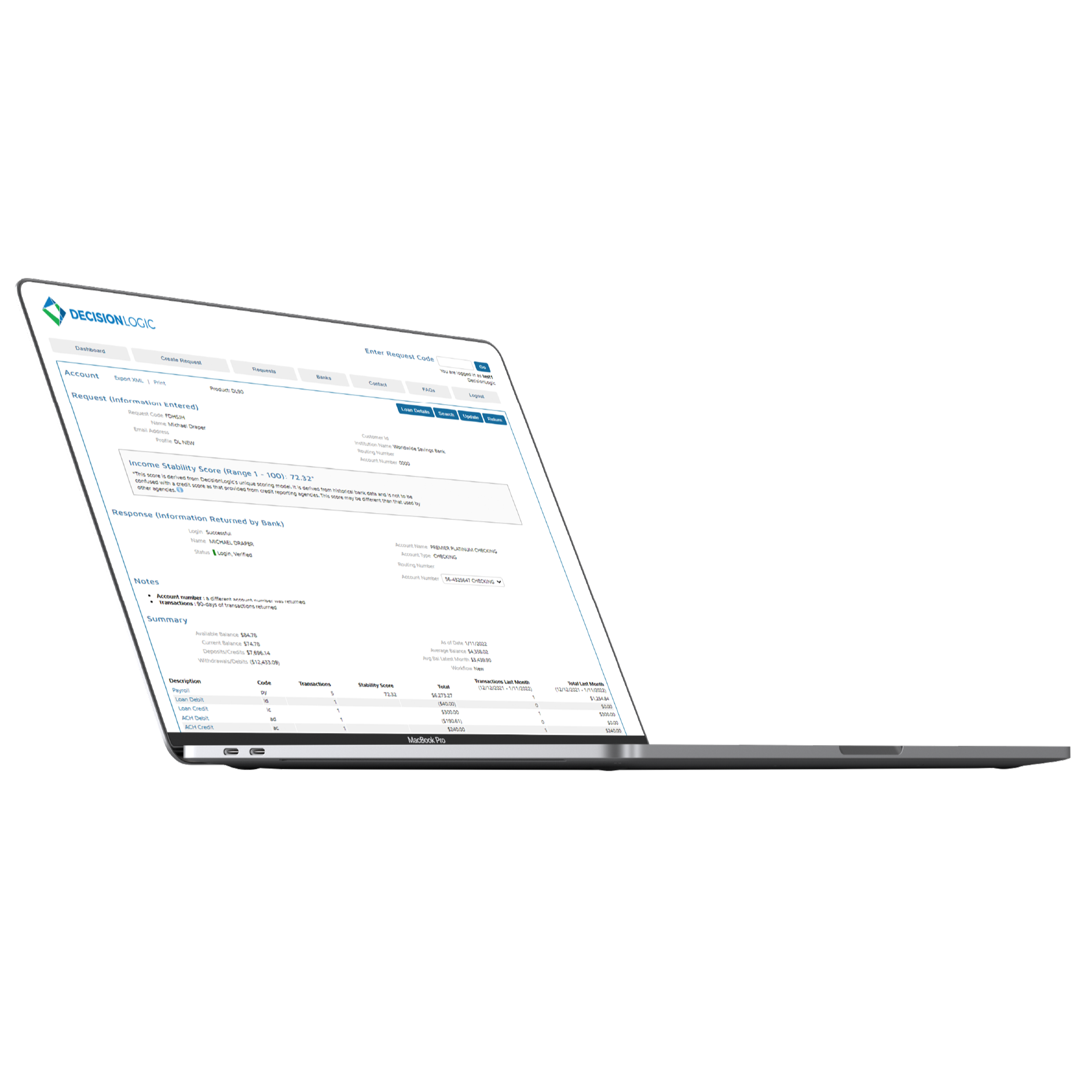
4. The institution opens the report
The requesting institution receives a read-only report. The screen example includes account information, balances and transaction summaries.
What the lender and underwriter do with DecisionLogic
From the institution’s side, the first job is to create the right request and explain it clearly. A merchant should know which institution needs the information, which application it relates to and where to get help.
Sending and managing the verification request
DecisionLogic offers a lender portal as well as integration options. A portal user can manage the request in the provider’s interface; an integrated institution can incorporate the workflow into its own systems. That choice affects the experience the merchant sees.
The institution’s workflow
The report supports a decision. The institution remains responsible for the application.
Request the right information
Associate the request with the application and tell the merchant which account is needed.
Review the returned data
Check the connection result, available history, account details and relevant activity.
Resolve questions and respond
Ask about missing records or unusual activity, then communicate the next application step.
An institution may use a portal, an API integration or additional analytics. Not every institution enables the same features.
Reading the report in context
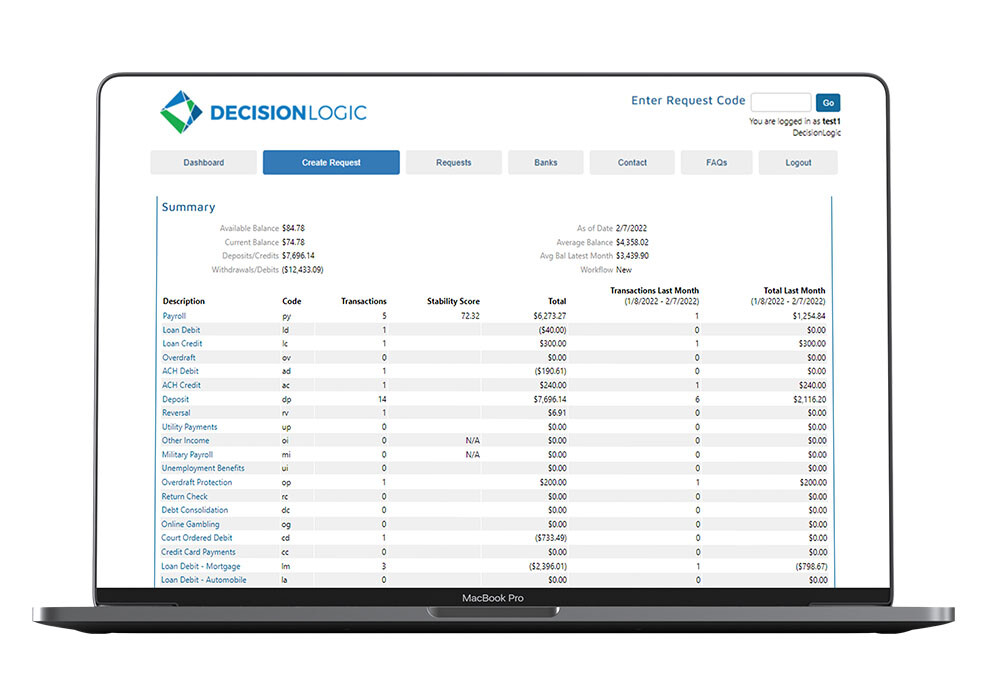
The published report below illustrates categorized transactions and summary information. It is a provider sample containing historical example data. Its dates, balances and score are not current customer information or lending thresholds.
Source: DecisionLogic’s published report example. Historical sample data, not a current customer or an approval standard. View the provider’s original walkthrough.
An underwriter needs to understand the story behind those records. A slow month may reflect seasonality. Transfers can inflate deposits without creating new revenue. A recurring debit may be an existing obligation that needs to be considered alongside a proposed payment. A report makes those questions easier to identify; it does not answer all of them on its own.
Account and ownership details: check that the returned information matches the account and applicant being reviewed.
Balances and cash-flow patterns: look beyond a single day’s balance and consider the available period.
Incoming transactions: distinguish operating receipts from transfers, refunds and financing proceeds.
Outgoing transactions: understand recurring expenses, debt payments and other commitments.
Missing information: clarify gaps or categorization issues before relying on the report.
A business cash-flow example
Suppose an account shows $40,000 in incoming transactions: $25,000 from customers, $10,000 transferred from another business account and $5,000 from new financing. The $40,000 total is not the same as $40,000 in sales. A reviewer needs to separate the sources and consider the payments attached to that new financing.
This hypothetical example explains why a lender may ask follow-up questions after verification. It is not a customer case or a DecisionLogic scoring formula. These are practical review considerations, not a claim that every institution applies the same underwriting rules.
Is Decision Logic legit and safe to use?
DecisionLogic is a real financial-data service operated by Clarilogic, Inc. It publishes product information, security practices, consumer resources and support channels. That establishes the provider’s identity. It does not establish that every message bearing its name came from a legitimate lender.
If you receive an unexpected link, call the institution using a number from your existing records or its verified website. Confirm the application and the reason for the request before entering information. A familiar logo alone is not enough.
How DecisionLogic made sharing bank information safer
In some older business-funding workflows, funders asked applicants for a month-to-date (MTD) screenshot or required a manual bank-login call with an underwriter. The goal was to check recent account activity and confirm that the statements submitted during underwriting were authentic. In a manual-login call, the applicant gave the underwriter access to online banking so the underwriter could pull the records and compare them with what had been submitted.
Both methods had drawbacks. A screenshot could be edited, cropped or leave out transactions, so it was not fraud-proof. Letting someone into an online-banking account introduced a different concern: the applicant was giving another person account access to complete what should have been a request for financial records.
DecisionLogic helped make that exchange safer. The applicant completes the verification flow and authorizes the connection, while the requesting bank, funder or other institution receives a read-only report. As DecisionLogic’s borrower FAQ explains, the institution can review the returned information without seeing the applicant’s online-banking login credentials or logging in as the applicant.
For the borrower, this reduces the need to hand account access to a representative. For the underwriter, records obtained from the financial institution provide a stronger basis for checking submitted statements than a screenshot alone. That reduces opportunities to pass off altered screenshots as genuine bank activity. It does not eliminate every form of fraud, and applicants should still verify the requesting institution and understand what information they are authorizing it to receive.
What security protections does DecisionLogic describe?
Its security page describes encryption in transit and at rest, role-based access controls, security testing and employee security training. These are the provider’s published practices, not an independent security audit by Excel Capital. No bank-data service can promise zero risk.
According to DecisionLogic’s borrower FAQ, neither DecisionLogic nor the requesting lender sees or stores your online-banking login credentials. This is the provider’s statement about credentials, not a claim that no financial data is retained. An institution can still receive and retain a report under the applicable terms.
What can an institution see?
Depending on the bank connection, the products used and your authorization, the returned information can include account identifiers and ownership details, balances, transaction records and derived summaries. Read the request rather than assuming it shares only your current balance.
Four things that should not be confused
Banking credentials
The information used to authenticate. DecisionLogic’s FAQ says the provider and lender cannot see these credentials.
Financial records
The account information and activity returned through an authorized connection. A read-only report still contains sensitive information.
Refresh access
An enabled feature can retrieve newer available data without another borrower interaction. Ask about scope, duration and how to stop access.
Payment authorization
Permission to debit an account is a separate matter. A verification report alone does not establish that you agreed to a payment.
DecisionLogic advertises a Refresh feature for obtaining newer available data without another borrower interaction. Do not assume that completing a single link means access can happen only once. Ask the institution which permissions apply to your request, whether ongoing access is enabled and how you can withdraw that permission.
Disconnecting a connection and deleting information already received are different actions. For questions about a DecisionLogic report, access, disputes or deletion requests, start with its consumer information page and the requesting institution. DecisionLogic’s website privacy policy has scope limitations, so the terms and notices associated with the actual service also matter.
Does DecisionLogic let someone withdraw money?
Its published verification process gives the institution a read-only bank report. Reviewing that report is different from initiating a debit. If a lender also asks you to authorize payments, read that separate authorization and repayment agreement carefully. Ask the institution to explain any wording you do not understand before agreeing.
DecisionLogic products and what each means for your application
DecisionLogic offers more than one bank-verification workflow. Its products page groups the core offering into Instant Account Verification, Identity Verification and Summary Analytics. Institutions can add capabilities around those products.
Instant Account Verification (IAV)
IAV is the part most merchants encounter when a lender requests bank information. DecisionLogic describes a blended connection approach using data partners and open-banking APIs. It supplies account and transaction information for the institution’s review. The available records and history depend on the connection and request; there is no reason to assume every bank returns the same period or fields.
Identity Verification (IDV) and DL Match
DecisionLogic’s DL Match identity-verification tool is powered by Experian. It checks key personal information and flags risk factors. This is distinct from signing in to a bank account. An institution decides whether to use it. A DecisionLogic bank request does not automatically mean you will be asked for a selfie or a document upload.
Summary Analytics and Income Stability Score
Summary Analytics categorizes income and expenses and applies proprietary scoring to highlight patterns. The separately listed Income Stability Score draws on available account data to assess payroll and income patterns. It is a provider-specific measure, not a FICO score or a universal loan-approval threshold. Consumer payroll patterns also need different interpretation from a business’s revenue.
Refresh, portal access and integrations
Refresh retrieves newer available data without another borrower interaction, subject to the applicable connection and authorization. Portal access gives institutions a way to manage requests without building a custom integration. Integration and automation options include APIs, custom rules and automated workflows that institutions can configure around their review process.
What you do, and what the institution may use
Some products operate behind the scenes. They are not all separate steps for the merchant.
Connect the requested bank account
Institution tool: IAV through a portal or integrated workflow.
Purpose: Receive available bank information for review.
Provide identity details if requested
Institution tool: IDV.
Purpose: Validate personal information separately from the bank connection.
Answer questions about the records
Institution tool: Summary Analytics and relevant scores.
Purpose: Interpret transactions and investigate patterns.
Understand any continuing access
Institution tool: Refresh or monitoring features, if enabled.
Purpose: Review newer information under the applicable authorization.
Excel Capital does not claim to use every product shown. The requesting institution determines its own setup.
Other named offerings and support features
DecisionLogic also promotes DL NextCheck for automated refresh and monitoring. Its NextCheck overview describes using updated account information throughout the lending process. The provider also advertises a First Payment Default Score on its homepage and DL Precision Engine as an automated-decisioning offering that does not require an integration. Institutions should confirm the available scoring, decisioning capabilities and terms directly with DecisionLogic for their intended use.
The products page lists live support, free workflow reviews, free integration and support, unlimited free training, and no contracts or monthly minimums. Its process overview also describes ongoing support for institutions and their borrowers, with customer and technical support included at no extra charge. These are the provider’s advertised service features; they do not mean every report or product is free. Institutions should confirm current pricing and what is included.
Decision Logic reviews: benefits, limitations, and our assessment
Our assessment focuses on what a business owner needs to understand before completing a request. Excel Capital facilitates DecisionLogic requests for institutions that use it. We are not presenting this article as an independent technical audit or a test of every DecisionLogic product.
Where it can help
A clearer document exchange: an authorized bank connection can give an institution structured records to review.
Less manual statement handling: available bank data can reduce the back-and-forth involved in collecting records.
A more organized review: transaction categories and summaries can help an institution identify questions earlier.
Where friction remains
Bank connections can fail: access, authentication or connection issues can interrupt the process.
Permissions deserve attention: a quick connection can still involve substantial financial information or continuing access.
Reports need interpretation: categorization and balances cannot explain every business circumstance.
Verification is not approval: a completed request does not settle the lender’s remaining requirements.
Third-party review sources
When checked on October 17, 2026, DecisionLogic’s BBB profile listed accreditation and an A+ business rating. A BBB rating is different from an average customer star rating and is not a technical security assessment. You can use the profile to examine the company’s identity and any available customer reviews or complaints.
DecisionLogic’s G2 profile provides feedback about the financial-data product. Look at the reviewer’s role, review date and number of reviews before drawing a conclusion. An institution user’s experience can help explain the reporting tools, but it does not predict a merchant’s loan outcome.
Reading reviews of lenders that use DecisionLogic
Separate a complaint about connecting a bank account from a complaint about a lender’s rate, approval decision or funding delay. They concern different parts of the experience. When reading third-party reviews, check the company name, website, date and whether the reviewer describes the bank-verification service. Search results also include restaurant software and employer reviews with similar names.
For merchants, the useful question is whether the requesting institution has explained the purpose, permissions and next steps clearly. For institutions, evaluate bank coverage for your applicants, data quality, support, consent handling and integration fit. A generic star rating cannot answer those questions for your particular workflow.
DecisionLogic vs. Plaid and other bank-verification platforms
DecisionLogic is not the only platform that can connect to bank information. Plaid and Mastercard’s open-finance services are other examples. Products, connections, data access and institution workflows differ, so it is misleading to call one service the only secure way to verify a bank account.
For an existing application, use the verification method requested by the institution. You generally cannot replace a DecisionLogic request with a Plaid connection on your own. Ask whether an alternative is available if you are uncomfortable connecting or your bank is not supported.
Decision Logic not working? Where to start
A failed connection does not tell you whether your application qualifies for financing. First identify where the process stopped, then contact the party that can resolve that step.
Match the problem to the next step
No link, wrong request or expired link
Ask the requesting institution to confirm the application and send a replacement link.
Bank sign-in does not work
Check your access on the bank’s own website. Resolve a locked account or password problem with the bank.
Security code does not arrive
Check the phone or authentication method registered with your bank. Complete the bank’s security prompt through the connection flow.
The connection keeps spinning
DecisionLogic’s FAQ directs users to support if loading continues for more than three minutes. Describe the error without sending passwords.
Your bank or requested account is unavailable
Tell the institution what is missing and ask which supported connection or alternative documentation it accepts.
Verification succeeded, but there is no loan update
Contact the lender or funding representative. DecisionLogic does not control the application decision or disbursement.
DecisionLogic lists (858) 586-0202 and support@decisionlogic.com for support. For an application facilitated by Excel Capital, your funding representative can help identify the requesting institution and next step. Avoid sending account passwords or authentication codes in support messages.
Frequently asked questions
What is Decision Logic bank verification?
It is an authorized connection that supplies bank-account information to a requesting institution. The institution uses the returned records as part of its own review. DecisionLogic is the service provider, not the bank holding your deposits or the lender deciding your application.
Why does a lender want my bank login?
The connection process authenticates access to the account whose records you are authorizing. Follow the verification flow rather than sending credentials to the lender. DecisionLogic’s FAQ says the lender and DecisionLogic cannot see your online-banking login credentials.
How long does DecisionLogic take?
Authentication and data retrieval can complete quickly, but bank security prompts, connectivity and missing information can cause delays. Do not confuse connection time with loan-review or funding time. Ask the institution for its application timeline.
How far back can DecisionLogic see?
The available transaction period depends on the connection and request. Ask the institution which history it needs and check the permissions presented. Older references to 90-day or 365-day products should not be treated as a universal limit for every current request.
Does DecisionLogic check my credit?
Bank verification and a credit-bureau inquiry are different activities. An institution may have separate identity, credit or other application checks. Ask which checks it will perform and review their authorizations. Do not treat a proprietary income score as your credit-bureau score.
Can I use bank statements instead?
Ask the requesting institution. Some may accept an alternative process; others may require a supported electronic verification. Do not assume that emailing a statement completes the existing request.
Can I use DecisionLogic without online banking?
The bank-connection process requires the appropriate access to your account. DecisionLogic’s FAQ directs users without online banking to the lender to discuss another option.
Why am I being asked to verify again?
The institution may need a different account, a new request or newer information. Confirm the reason with your contact. A second request does not, by itself, establish approval or a problem with the application.
Get help with verification or explore business financing
Already completing a request? Contact the institution that sent it. If Excel Capital is helping with your application, contact our team so we can clarify the request and direct you to the right next step.
Still comparing business financing? You can explore funding options with Excel Capital. The appropriate verification process depends on the institution involved. Connecting a bank account does not commit an institution to approve or fund an application.
About this review
Product and process information checked October 17, 2026 against DecisionLogic’s products, walkthrough, FAQ, security information, terms and consumer resources. The four editorial illustrations were created with AI to explain example roles; they do not depict actual clients or staff. The product screens are DecisionLogic’s published examples. Products and connection screens can change.
Want to know how write a business plan? Not sure what needs to go in each section or how long it should be? Read on to find out.
How to Write a Business Plan
Every small business has a beginning. It’s an exciting time with a lot to look forward to.
But the launch of every small business is not created equal.
If you want to make sure your business gets started off on the right foot, you need to make sure that launch includes a critical element: a well-crafted business plan.
Creating a business plan is an integral part of starting a business. It’s an A-to-Z guide to running your business the way you want (and need, for it to be successful).
That’s why in this guide, we’ll show you everything you need to know about writing a business plan, including:
What is a business plan?
The 8 steps to writing your business plan
How long should a business plan be?
Business plan examples
So, let’s start with the obvious question:
What Is a Business Plan?
A business plan is a guide of sorts, both for you and those interested in your business (i.e. potential investors), that lays out your plan for growing and developing your business.
It tells the story of who you are as a company, what your goals are, and how you’re going to get there. And it does all that while being as thorough as possible.
Goals should have dates, a detailed marketing plan to back that up.
A product strategy that makes it clear why you’re selling what you’re selling and how you’re going to make it better.
And, finally, a financial plan that shows how you’re going to manage all that money your business is going to be making.
If there is any part of running a business that you’re unfamiliar with, this will be the point that you’ll want to start doing some research, as you’ll need a basic grasp of everything from marketing, product development, financials, and your organizational structure to create a good business plan.
What Needs to Be In a Business Plan? 8 Steps to Writing a Business Plan
Now that we’ve got that out of the way, what are you supposed to put into your business plan?
There are 8 things every good business plan should have.
They are:
Executive summary
Company overview
Market analysis
Organizational structure
Product strategy
Marketing strategy
Financial plan
Appendix
With a thorough description of each of these areas, you’ll have a detailed business plan in place that should not only guide you in your business’ development but make you look good with investors.
How to Write a Business Plan: A Step-by-Step Guide
Creating a business plan can seem a bit overwhelming when you consider everything that goes into one.
But if you take it one part at a time, you’ll find the plan coming together before you know it.
Now, let’s jump into those 8 steps we just talked about and do just that: break each part down into easy steps to follow.
And remember: If you’re unsure of anything right now, just write down what you do know about each section. Later, you can come back and flesh that section out.
With that said, here are the 8 parts of every business plan:
1. Write an executive summary
First, you’ll want to write your executive summary.
An executive summary is a summary of where your business is now and where you want it to go. If you’re trying to interest investors, this is also a good place to add a little bit about what makes you stand out as a company and why your company is going to be a success.
How long should it page? About a page is fine, though it could be longer.
If that feels impossible, consider that your executive summary is exactly that: a summary. It’s not a thorough breakdown.
Think of your executive summary as the prelude to the rest of your business plan. Later, you’ll go more into your product, marketing, positioning, and financials. For now, just give them an effective and concise summary of the most important parts.
What are those? The SBA recommends the executive summary of a business plan includes these 6 pieces of information:
Mission statement: Describe your business and its goals in a paragraph.
General company information: This includes the date of your company’s formation, the owners/founders, their roles, and how many employees you have.
Highlight successes: Place any notable data (in visual form such as a graph) regarding the growth of your business. Remember, your business plan should impress potential investors (unless you’re solely doing it for your own use, in which case this can be skipped), so you’ll want to offer something that signals you’re bound for success if you have it or other positive notes about why you’ll be successful if you don’t have that.
Products and/or services: Describe your product or service and your market.
Financials: This section is important if you’re looking for investors as you’ll list your funding goals as well as anyone you’ve already worked with in the past to secure funding.
Plans and goals: What are your goals for the future. The last part of your executive summary should mention what those goals or plans are.
This first section might seem like a doozy, but keep in mind that it’s arguably the most important section of your business plan because it summarizes everything that will come after it.
The great part about starting with this too is that it will help give you a better idea of what you’re going to put in each of the proceeding sections, making the rest of the business plan go smoothly.
2. Complete your company overview
Next is your company overview. Consider this the basic information that those interested in your business will need to know about how you function.
That includes:
What does your business do? You spent a lot of time selling your business in the previous section, now you need to make it crystal clear what your business does.
Your market: Who do you sell to? What is the need you’re serving? How are you serving that need?
Your business type (legal structure): Explain what business structure you are and why you’ve decided to choose that structure. Also, list how ownership is divided and managed.
Make sure your answers to these points are to the point. This is an overview, like the last section, so you don’t have to spill all the details (not until later).
However, you also want to make sure it paints an attractive view of your company if you’re preparing this to acquire funding.
3. Do a market analysis
Next on the list is a market analysis. This is an analysis of your industry, your competitors, and any other important information relative to your market.
Now is when we move from concise overviews to more detailed breakdowns of the major areas of a business, so you’re going to want to make sure to get into the nitty-gritty here and show that you understand the market you’re stepping into.
And if you’re just doing this for your own use, it’s a great exercise it making sure you know enough about your industry and market as a whole.
Make sure to include this information in your market analysis:
Industry summary: List the basic information about your industry: its size, growth, current health, and any data connected to it related to trends or anything else.
Target market demographics: Now focus in on your target market: who specifically are you selling to? Beyond that, you’ll want to talk about who your customers are, where they’re located, and any other information relative to demographics.
Target market size: How big is your target? How fast is it growing? These are also questions you’ll want to answer in this section.
Target market behavior: Where does your target market make purchases? When do they buy? List anything related to your market’s behavior.
Market share: How much market share do you predict being able to capture?
Pricing tolerance: You’ll also want to know everything you can about what you can and should be pricing your product at.
Market entry conditions: What barriers are there to entering your target market? You need to be aware of these before jumping in, whether it’s licensing, regulations, expertise in personnel, etc.
Competitors: Who are your competitors? What makes them stand out? How will you be better than them and/or stand apart? What are their strengths and weaknesses?
As you might be able to tell already, this is possibly the most research-intensive part of the entire business plan.
However, having said that, the research you’ll be doing to complete this section is invaluable, even necessary, to your business’ success.
Leave out even one of the above sections and you’ll be flying in dark without all the information you’ll need to make smart decisions as your business grows and is presented with challenges.
4. Define your organizational structure
Moving on from your market analysis, the next deep-dive is into your organizational structure.
This section is all about defining what kind of system your business uses to manage itself.
Who does what? Who reports to who? How do your teams break up? These are just some of the questions you’ll want to answer.
Here’s everything you’ll need to define:
Organizational structure: Create a visual document/chart of some kind that shows how your business is structured, including who has what role and who is in charge of managing what part of the business.
Ownership: If you have partners, how does ownership break down? Who is responsible for what?
Backgrounds: Detail the backgrounds of all notable team members including partners, managers, and your board of directors. This section can be quite long, and that’s okay. Make sure not to leave anyone out.
Future hires: How does your team need to expand in the future? What key roles do you need to fill on the way to accomplishing your goals?
5. Define your product strategy
Now let’s move on to your product strategy. This mostly has to do with product development and the research involved in positioning your product within your market.
Here’s everything to include in this section:
A general overview of the product and/or service: What product or service(s) do you offer? What need does it fill in your market for your target customer?
Product development stage: Is your product complete and ready to ship? Have you sold units/acquired customers already? Is it just in the ideation stage? If it’s the latter, describe what you’ll be doing to complete the product or service offering to have it ready to ship.
Patents / Intellectual property: If your product or service depends upon a patent or some kind of intellectual property, explain what where they stand.
Sourcing and fulfillment: Who is making the product? Where are you shipping it from? Make sure this is clear to you now there are no problems down the line when it’s time to start selling.
Remember that as you craft this section, like all the other sections, you want to show that you know what you’re talking to if you’re preparing your business plan for potential investors.
Make your product, service, or idea look good and explain why you believe it will be successful.
6. Define your marketing strategy
Next, with your market and product sections complete, you’re well-prepared to move on to defining your marketing strategy.
In this section, include any and all relevant information related to how you’re going to market your product or service.
This includes:
Advertising and promotion: How will you market your product or service? This section is likely to be on the longer end as you should be detailing not just how but why.
Positioning: How will you be positioning your product or service? What is your reasoning supporting this decision?
Sales strategy: How will your sales team function? Will you have one at all? How will they work with marketing? At what stage will they begin interacting with the customer and what kind of overall sales process will be implemented?
Validation markers: You should have several hypothesis or tests in place to validate your offering, it’s positioning, and marketing and sales efforts. Without these things in place, there’s no way to know if your product or service is a success or failure and no reference point to come back to to make improvements.
This is one of the main sections you may yet have quite a few question marks on. As we mentioned earlier, don’t worry. Just do your best to fill out as much of this section as possible, do the necessary research, then come back and finish it later if necessary.
7. Write your financial plan
The final step in terms of the written information you need to provide for your business plan, it’s time to dive into the financial side of things.
How much does your product cost to source? How much are you selling it for? How many units can you move in a month? What is your overhead and other costs? These are just some of the questions you’ll want to answer.
If your business has been around for a bit, the best place to start is your current financial reports. Things like your profit and loss report, income and revenue statements, accounts receivable and payable, and any other financial reports.
And if you don’t have anything, create something that shows projections for important financial figures such as sales and revenue. Just make sure you’re not making numbers up out of thin air. Support these projections with market and competitor research.
These are some of the documents you can include relevant to projecting future financials:
Cash flow forecast
Projected income
Capital expenditure budget
If including projections, make sure to include them for the next 12-month period as well as either 3 or 5 years at least for a more long-term view.
With those projections out of the way, you’ll also want to include a section on funding. If you’re looking to acquire investors or will be investing a portion of your own funds, here is where you’ll outline exactly what you’ll need.
Make sure to include:
How much funding you’ll need to get started
Projected future funding needs
And what those funds will be used for
After reading this section of your business plan, an investor should come away with a clear understanding of why you need funding and what acquiring that funding will allow you to do for the business.
8. Include an appendix
The final step in good a business plan is less new information as it is the place where you stuff all those things that are important but might not have fit anywhere else: an appendix.
In this appendix, you’ll want to stash any and all important data or other supporting information you didn’t include throughout your plan already.
That includes additional:
Data: Charts, graphs, you name it.
Details: Anything relevant to your business that may not have fit anywhere else.
Legal documents
Additional images: If you’re a restaurant, additional menu item images, you get the idea.
Resumes: If your plan may have been lacking in supporting data or you simply think it will help, you can include your resume and the resume of any of your founders or key managers as a supporting document.
Anything that you feel is important or valuable but just didn’t quite fit in the plan should go here. And since it’s a gathering of somewhat random items, make sure to include a table of contents to make this section easier to navigate.
How long should a business plan be?
At this point, one of the questions you might be left with is: exactly how long does my business plan need to be?
Fortunately, that’s an easy question to answer:
As long as it needs to be to succinctly outline or define each major aspect of your business.
The SBA suggests a business plan be no more than 50 pages. However, that all depends whether you’ll have investors reviewing that plan or not. If it’s just for your own personal use, even a few pages can suffice.
Your marketing plan might be a few detailed paragraphs. Then again, it might be a bit more involved and require several pages.
Ultimately how long each section will be will depend on what you need to say and your ability to break down that information as succinctly as possible (without leaving out any vital information).
Business plan examples: What does a business plan look like?
Now that you know how to write a business plan, let’s go over some business plan samples.
We know that was a lot of steps, and it might not be entirely clear what your business plan should look like, so we’ve gathered some great samples as additional resources that you can review to get a better idea of what your business can look like.
Keep in mind that if you use any kind of software that allows you to put together a business plan, such as:
then you won’t need to worry about looking over samples as they will guide you through the process. Still, it can be nice to see an example to make sure you’re creating your business plan right.
With that said, here are a few business plan examples to help you get a better idea of how your completed plan should look:
For the most part, business plans are the same across industries, with only small differences.
Keep in mind that once your business plan is complete, take some time to show it to everyone from your business partners to key personnel to get their feedback.
The more eyes who are directly connected to your company’s goings-on who look at it, the better it will be and the more buy-in you’ll be able to get right from the get-go in terms of your company mission and direction of each major moving part.
Get the Startup Capital Your Business Needs with Excel Capital
Now you know how to write a proper business plan, there’s only one thing left to do: create it.
Take the steps we’ve broken down here and start writing a business plan of your own one step at a time, making sure that each section is as comprehensive as possible.
After all, this is going to serve as a guidebook of sorts that will help direct your entire business’ dealings for years to come, so it’s worth taking some time to make it right.
Getting things right is also important with regards to funding.
With the right funding in hand, you can grow and establish your business faster and keep things running smoothly.
At Excel Capital, we offer a variety of business funding tools, many which you can be approved on with low or no credit and fund in as little as 24-48 hours.
Apply to get the funding your business needs with Excel Capital today:
Get the capital your business needs without the hassle. Apply for a small business loan with Excel Capital: Apply Now
Bizfi: The Rise (and Fall) of a Fintech Trailblazer
The year was 2005.
A brand-new company– Merchant Cash and Capital (MCC), later known as Bizfi– was shaking up both the financial and technology industries in the United States with a revolutionary new approach to conducting business (especially online).
The mission for Merchant Cash and Capital was simple and straightforward in these early days. MCC would act as a purchaser of future credit card sales, a brand-new concept in 2005 and a move that laid down the foundation for the future financial technology movement of today.
Growing rapidly in the first five years of its existence, Merchant Cash and Capital founder Stephen Sheinbaum decided to establish a secondary operation– Next Level Funding– that acted as a broker for small business owners and entrepreneurs that were having a tough time getting financing in the middle of the Great Recession.
Next Level Funding was going to help drive business to Bizfi, still then Merchant Cash and Capital, and accelerate the growth of their unsecured business loans through direct calling or telemarketing and other online sales channels.
The fintech movement takes off
At this stage in the early history of the fintech movement, online businesses were beginning to take off, opening up a world of opportunity for entrepreneurial endeavors that simply hadn’t existed before.
Shopping online had finally “gone mainstream” and people were familiar with– and maybe more importantly comfortable with– sending their personal, private, and payment information to strangers over the internet.
On the flip side of things, traditional lenders and business owners were anything but familiar with these online enterprises.
They remembered the Dot Com Bubble of the 1990s– and the way it blew up in many business owner’s faces– and looked more than a little bit skeptically at what people were calling the true power of the Internet and how it might revolutionize business forever.
Combine that with the fact that the Great Recession was in full swing (peaking in 2008, three years after Merchant Cash and Capital was founded) and traditional businesses were folding left and right and creditors were finding more people defaulting on their loans than ever before, and it’s easy to see why a company like Merchant Cash and Capital was able to swing in on a chandelier and start gobbling up market share.
Bizfi is formed
It took 10 years of rapid expansion to decide that it was time to bring both Merchant Cash and Capital and Next Level Funding under the same roof, operating them as a new single entity.
Under the leadership of founder Stephen Sheinbaum, the organization was restructured and reorganized, offices were consolidated, and the workforce was brought under a single roof. And, at the same time, there was rapid expansion.
Ten years from MCC’s founding, 2015 saw Merchant Cash and Capital and Next Level Funding merge under the same roof of the Bizfi moniker.
And, as it would have it, success for the company formally known as Merchant Cash and Capital came very, very easy.
By the time 2016 rolled around even the most old-school and traditional of lenders recognized just how powerful, important, and influential the fintech industry was going to be.
Bizfi had a huge head start on the rest of the pack, as according to industry reports they were one of the largest originators of merchant cash advance packages in existence at the time.
And then, just like that… the company disappeared almost completely.
What drove Bizfi out of business?
Within less than a year of the time that it seemed inevitable they would take their place as a top player in a quickly growing industry, Bizfi was out of business.
Journalists that had been following the meteoric rise were stunned. Industry experts couldn’t figure out what had happened and even those that had been working with Bizfi were shocked to learn that they were going to be shuttering their doors forever just when things looked like they were poised to take off like a rocket.
A postmortem is still being conducted on the company formerly known as Bizfi, partly due to the fact that it didn’t cease operations until late 2017, and much of what happened during the period between 2016 and 2017 that could have changed the company’s fate so drastically remains unclear.
One thing, however, is certain: Between 2016 and early 2017, Bizfi had grown too large far too quickly and that led to several factors that would eventually spiral out of control.
Several factors likely contributed to driving Bizfi out of business, but there were primary red flags among those factors.
Here are some of the primary factors that led to Bizfi going out of business:
They hired too many too quickly that did not have enough underwriting experience
Prioritizing closing deals, Bizfi hired quickly but not effectively, choosing to hire many who didn’t have enough underwriting experience. This led to a cascade of negative effects.
First, underwriting managers were incentivized to fund as many deals as possible.
That might sound obvious, but they were encouraged to close deals to cover up their default percentage even if the deal didn’t make sense business-wise.
As a result, they funded too many large deals with too high a risk.
They funded deals for brokerages, also known as ISO shops, that shouldn’t have been funded, especially considering the size of the deal.
They lent heavily to young businesses
Bizfi was known at the time for offering entrepreneurs that only had six months of business experience under their belt and monthly revenues of at least $15,000 highly favorable financial packages that likely didn’t befit their financial or business standing.
They found many new entrepreneurs who wanted to take advantage of their services, but those same deals quickly ran their businesses into the ground.
After all, nearly 75% of all new businesses will eventually fail. Lending to such young businesses large cash sums was unheard of due to the risk, and unfortunately, Bizfi became a reason why that’s the case.
They lent heavily in high-risk industries
Similarly, Bizfi also became a popular financing option with some of the riskier industries in the entrepreneurial world:
Brick-and-mortar retail shops
Restaurants and bars
Health and fitness centers
And business service operations
These together made up the bulk of the Bizfi clientele, though each of those industries is considered high risk, high turnover, and has a high likelihood of failure in the first five years (SBA).
Eventually, Bizfi was sending more money out the door than they were bringing in, even though the bulk of their loans were short-term with sky-high interest rates.
Compared to traditional lenders with 10% APR packages, Bizfi routinely offered loans that carried an APR of 150% or more– interest rates that most entrepreneurs found next to impossible to meet with any real consistency or regularity.
Eventually, Bizfi began searching for outside investment, especially as the business markets started to cool across the globe. Institutional interest in the fintech industry continued to remain strong, but many of these larger operations had little to no interest investing in a company as overextended as Bizfi had become.
And by July of 2017, the Bizfi party was officially declared over.
Bizfi closes its doors
In July of 2017, according to sources close to the company, all remaining employees were given a 90-day notice that the company was to cease operations and terminate their employment.
It was the culmination of a series of layoffs, this the largest at more than 200 layoffs– many of which had been original employees at Merchant Cash and Capital or Next Level Funding.
In a CNBC interview in 2015, Bizfi founder Stephen Sheinbaum said that they had hopes of securing an equity investment that would allow them to go public by the following year in 2017. However, that investment never became a reality.
July 2017: Bizfi sells its marketplace and other assets to World Business Lenders
Following the wave of layoffs, the assets held by Bizfi were divvied up and sold off, with many of them purchased at deeply discounted prices by World Business Lenders or WBL (formerly one of the top competitors for Bizfi in the fintech space).
According to Bizfi founder Stephen Sheinbaum, who joined WBL as a managing director in July of 2017, WBL purchased the Bizfi brand, marketplace and other pieces of the company.
August 2017: Bizfi sells its portfolio to Credibly
One month later, in a separate deal, Bizfi sold the servicing rights to its $250 million dollar portfolio and 5,200 merchants to another fellow competitor, Credibly.
“Acquiring the servicing rights of BizFi’s portfolio is a testament to our data-driven approach and laser focus on the working capital needs of small businesses,” Credibly founder and Co-CEO Ryan Rosett said in a press release. “We welcome our new customers and are committed to ensuring that their growth capital needs are met.”
According to a Bloomberg report, the deal allows Credibly to offer additional capital to that existing 5,200 customer base.