

Asked to connect your bank account through DecisionLogic before a loan can move forward? It is reasonable to want to know who will see your information and what happens after you connect.
DecisionLogic is a bank-verification and financial-data platform used by lenders and other institutions. With your permission, it helps the requesting company review account information and activity. It does not lend you money or approve your application.
Some institutions we work with use DecisionLogic, and we help facilitate their bank-verification requests. This guide explains both the merchant’s steps and the institution’s review.
Here to complete a request? Go straight to login guidance or the merchant walkthrough.

Decision Logic login: borrowers and lenders
The right login depends on why you are here. A borrower completing a verification request follows a different path from an employee signing in to an institution’s account.
Borrowers and merchants
Open the verification link sent by your lender or the institution handling your application. Check who requested it, read the permissions, then follow the bank connection prompts.
Missing or expired link? Ask the requesting institution for a replacement. DecisionLogic’s FAQ says its support team cannot send you a new lender request link.
Follow the merchant walkthroughExisting institution users
Use the official DecisionLogic portal with the account credentials assigned to you by your institution. These are separate from a merchant’s online-banking credentials.
Open the official lender portal
This button leaves Excel Capital and opens DecisionLogic.
Search results also include an unrelated restaurant-management product called Decision Logic. Check that you are using the bank-verification provider at decisionlogic.com. For request-link guidance, see DecisionLogic’s borrower FAQ.
Decision Logic loans: what the verification means for your application
“Decision Logic loans” usually means loans offered by institutions that use DecisionLogic during their review. There is no single DecisionLogic loan product, interest rate or approval requirement. The lender or funding provider sets those terms.
For a business owner, a verification request may help an institution check the account associated with an application, review available transaction history and understand how money moves through the business. DecisionLogic describes these uses in its business-lending materials.
A bank balance is only a snapshot. An underwriter may also consider recurring receipts, payment obligations, seasonal changes and low-balance periods. A large deposit could be sales revenue, a transfer between accounts or proceeds from another financing agreement. Those distinctions matter when assessing the business’s ability to make payments.
What types of lenders use DecisionLogic?
The platform serves different institutions, including business lenders, consumer lenders and equipment-finance providers. A provider’s use of DecisionLogic does not tell you whether it offers the financing you need or whether you qualify. Confirm the provider’s identity, products and terms directly before applying.
If you are comparing small business loans or a business line of credit, focus first on the amount needed, repayment schedule, total cost and the business’s cash flow. The bank-verification platform is one part of that process.
How do you pass DecisionLogic bank verification?
First, separate completing the bank connection from qualifying for financing. To complete verification, use the correct request, connect the account the institution asked for, and finish your bank’s authentication prompts. If the connection fails, use the troubleshooting steps below.
For the lending review, ask the institution which records it needs and be ready to explain transfers, unusual deposits, existing payments or missing activity. There is no universal DecisionLogic minimum balance, overdraft limit or passing score that guarantees a loan. Any financing requirements come from the institution reviewing your application.
Does completing DecisionLogic mean you are approved?
No. A successful connection means the verification step completed. The institution still needs to review the information, resolve any questions and make its decision. Contact that institution for approval status, funding timing or an explanation of an offer. DecisionLogic cannot provide those answers for it.
If a different institution requests a new verification, do not assume an earlier link covers the new application. Ask which business account and request you should use.
How does DecisionLogic bank verification work?
The basic exchange is straightforward: the institution requests information, you authorize the connection, and the institution receives a report. The exact screens and available records depend on the bank connection and the products the institution has enabled.
From verification request to application review
Two participants, with different responsibilities at each stage.
- 1Institution sends the request
A lender or other institution supplies a link associated with your application.
- 2Merchant checks the request
Confirm the sender and read what information the connection will share.
- 3Merchant connects the bank
Follow the authentication prompts and any bank security challenge.
- 4Verification completes
Look for the completion message and follow the return instructions.
- 5Institution reviews the report
The reviewer checks available account data and follows up on missing context.
- 6Institution gives the next step
Application review, an additional request or a funding decision comes from the institution.
A completed bank connection is not a loan approval. Source: DecisionLogic’s process overview and FAQ.
How to complete DecisionLogic as a merchant or borrower
Before starting, have access to the online banking for the account the institution requested. If your business has several accounts, ask whether it needs the operating account, a deposit account or more than one account. Connecting the wrong account can lead to another request.
Your checklist before and after connecting
Before you begin
- Confirm the request with your known contact if it is unexpected.
- Check that you can sign in to your bank directly.
- Have your bank’s authentication device or phone available.
- Read the permission and account-selection screens.
Before you close the window
- Complete any bank security prompts within the connection flow.
- Check for a success message or instructions to try again.
- Return to the requesting institution for application updates.
- Keep the institution’s contact details for follow-up questions.
Never email or text your online-banking password to a representative.
Follow the request through the connection screens
- Open the institution’s link. If the request does not match an application you recognize, verify it through a contact method you already trust.
- Find your financial institution. Choose the bank and the correct online-banking connection, including a business-banking option when applicable.
- Authenticate and review permissions. Follow the prompts presented for your bank. A supported connection may take you to your bank’s own sign-in or authorization screen. Complete any multi-factor authentication there.
- Select the requested account when prompted. Review the account details rather than choosing the first account automatically.
- Finish and return to the institution. A success screen confirms the connection step. Ask your contact whether anything else is needed for the application.
The examples below come from DecisionLogic’s published walkthrough, reviewed October 17, 2026. They are the provider’s screen examples in device mockups, not a live customer application. Your bank, connection method and institution may show different screens. Select an image to see it larger.
1. The institution sends the request
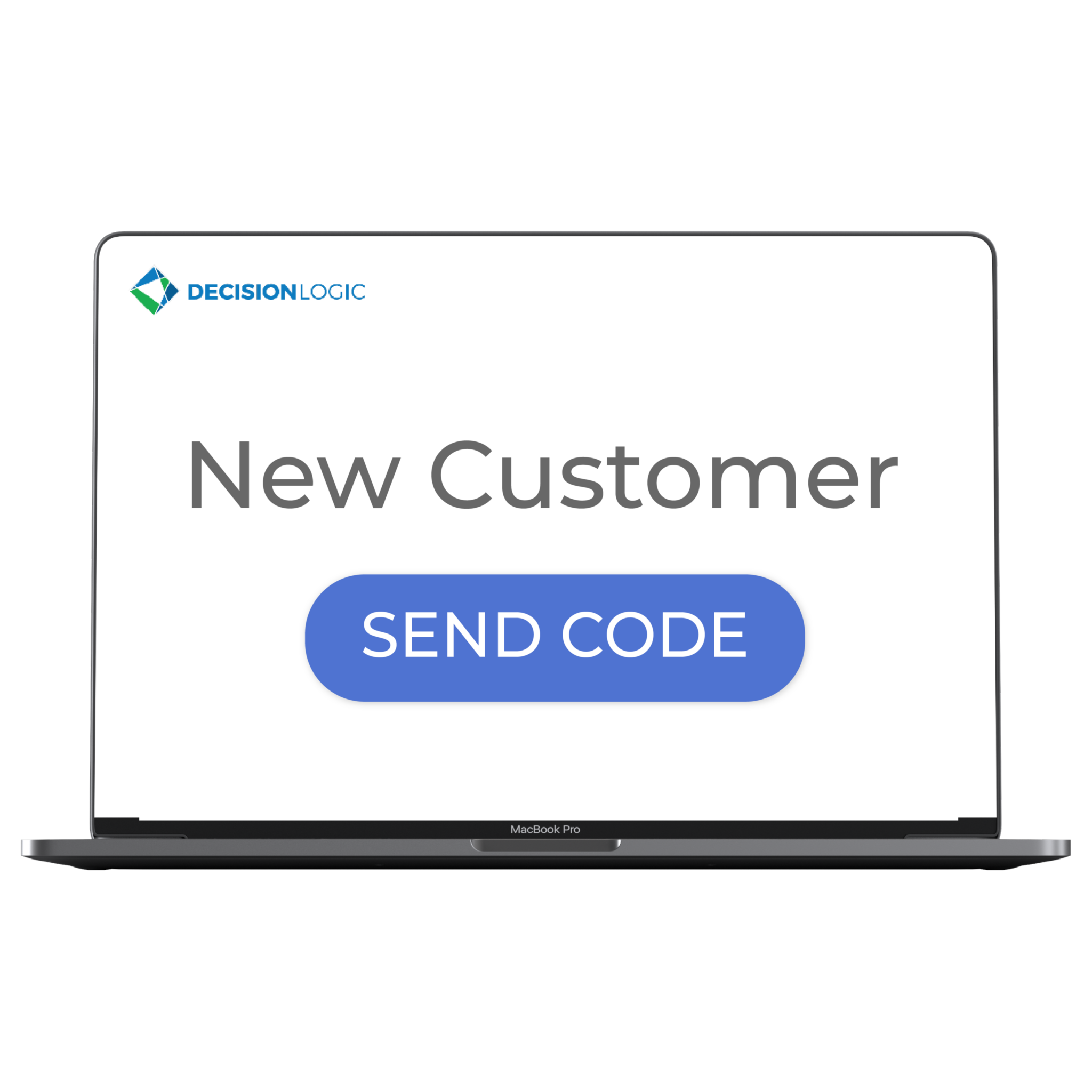
The provider’s example shows the institution starting a new customer request. The merchant receives the corresponding link by text message or email.
2. The merchant selects the bank
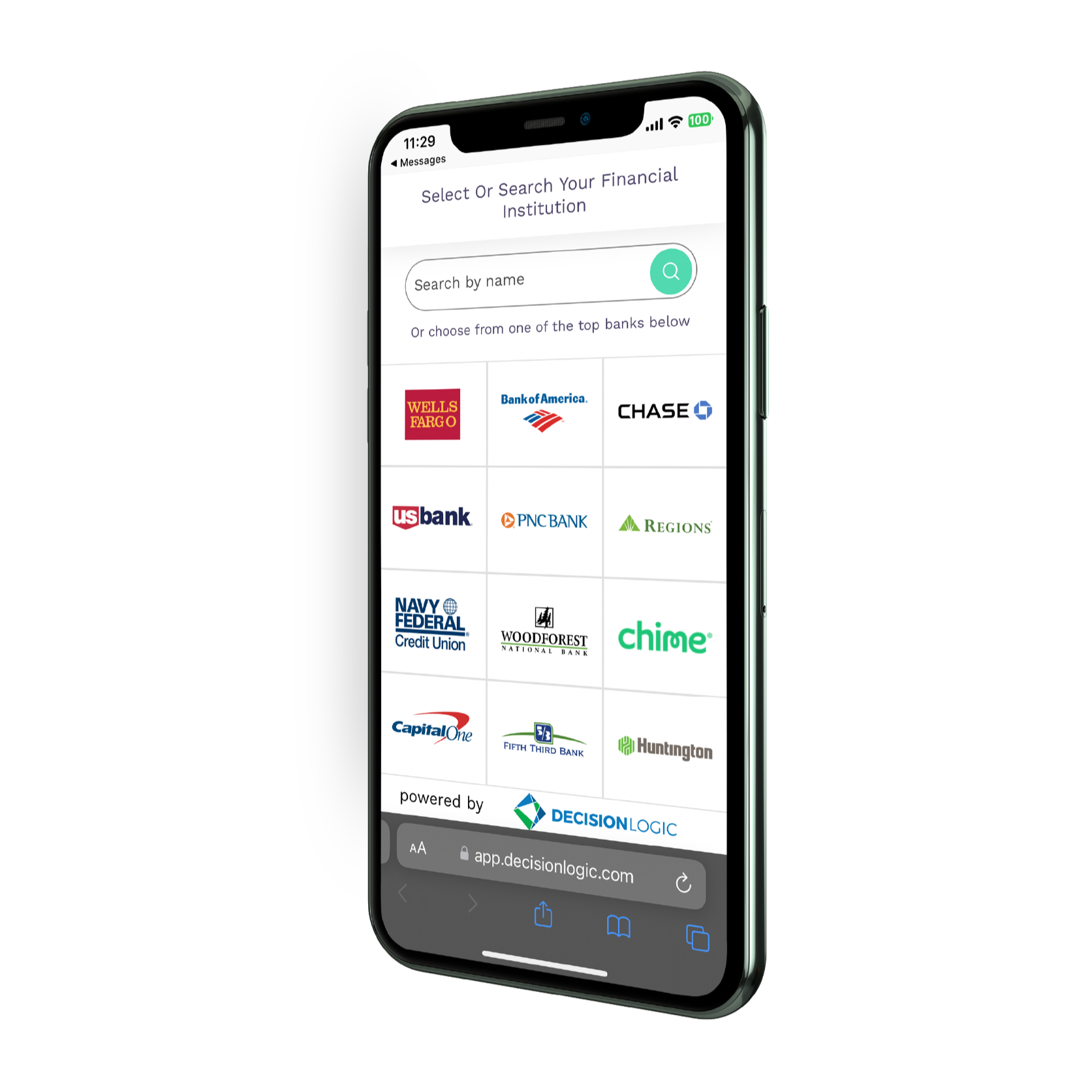
This published screen shows bank selection. Continue through the authentication and permission steps shown for your bank.
3. The merchant receives confirmation
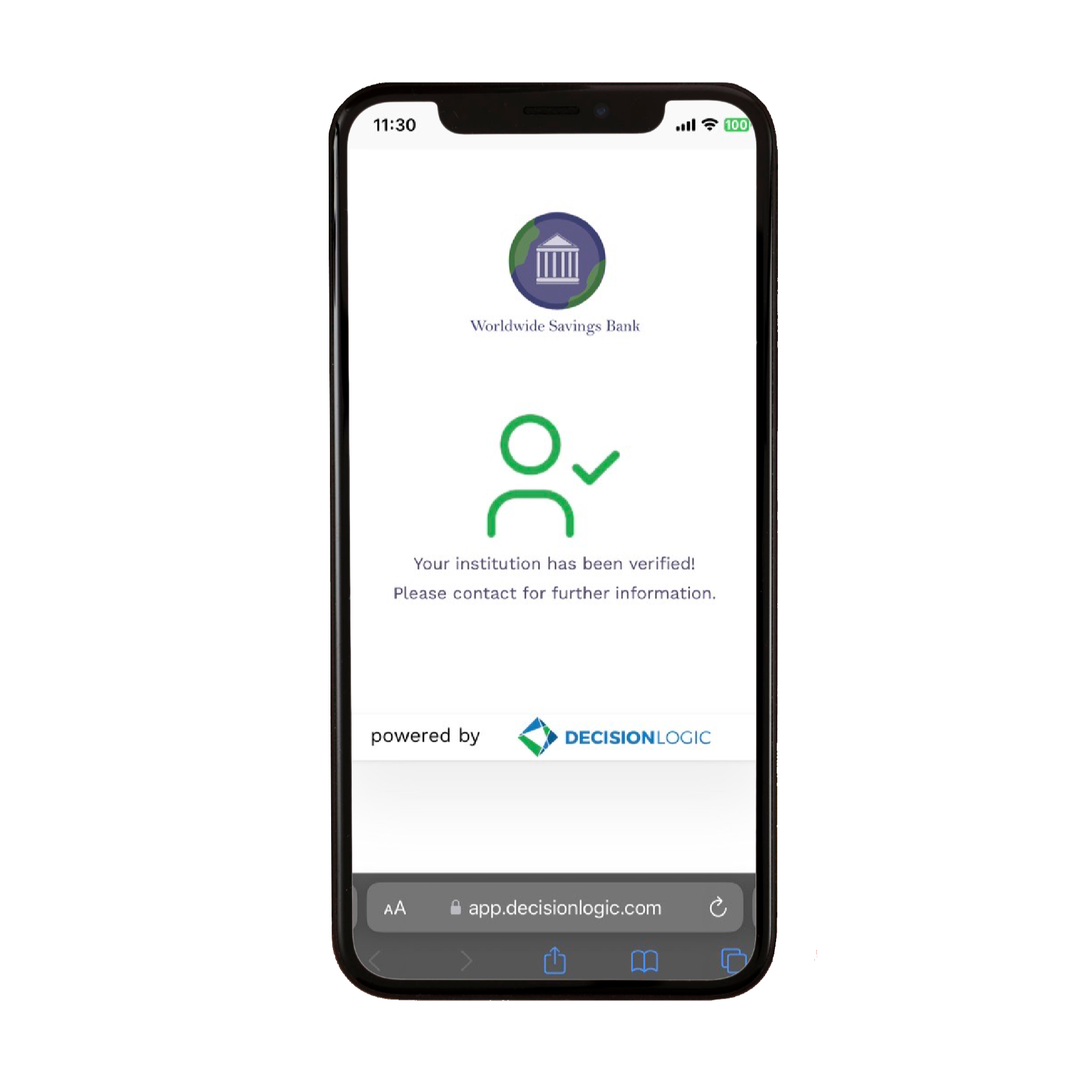
The completion message concerns bank verification. It does not confirm that a loan has been approved or funded.
4. The institution opens the report
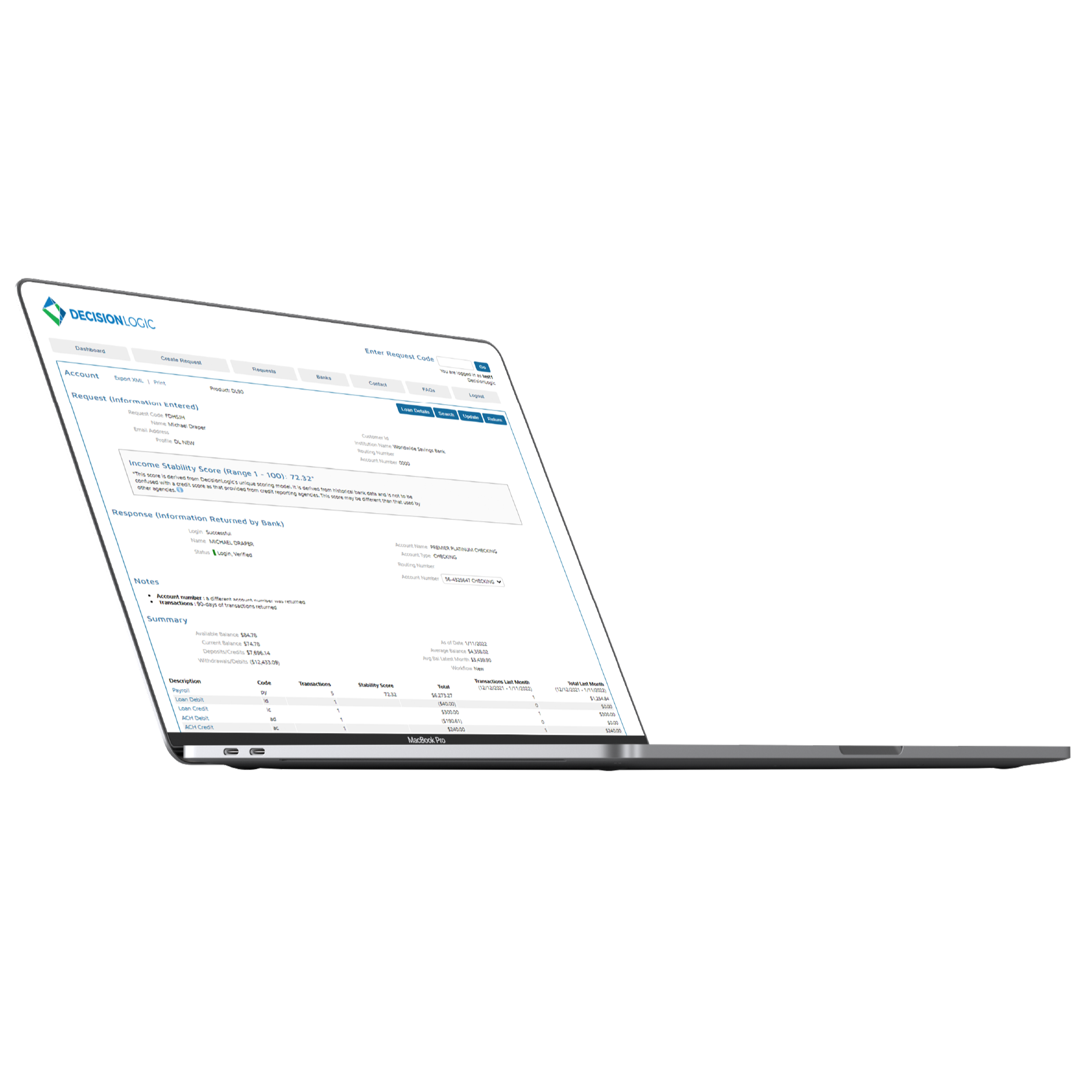
The requesting institution receives a read-only report. The screen example includes account information, balances and transaction summaries.
What the lender and underwriter do with DecisionLogic
From the institution’s side, the first job is to create the right request and explain it clearly. A merchant should know which institution needs the information, which application it relates to and where to get help.

Sending and managing the verification request
DecisionLogic offers a lender portal as well as integration options. A portal user can manage the request in the provider’s interface; an integrated institution can incorporate the workflow into its own systems. That choice affects the experience the merchant sees.
The institution’s workflow
The report supports a decision. The institution remains responsible for the application.
- Request the right information
Associate the request with the application and tell the merchant which account is needed.
- Review the returned data
Check the connection result, available history, account details and relevant activity.
- Resolve questions and respond
Ask about missing records or unusual activity, then communicate the next application step.
An institution may use a portal, an API integration or additional analytics. Not every institution enables the same features.
Reading the report in context
The published report below illustrates categorized transactions and summary information. It is a provider sample containing historical example data. Its dates, balances and score are not current customer information or lending thresholds.
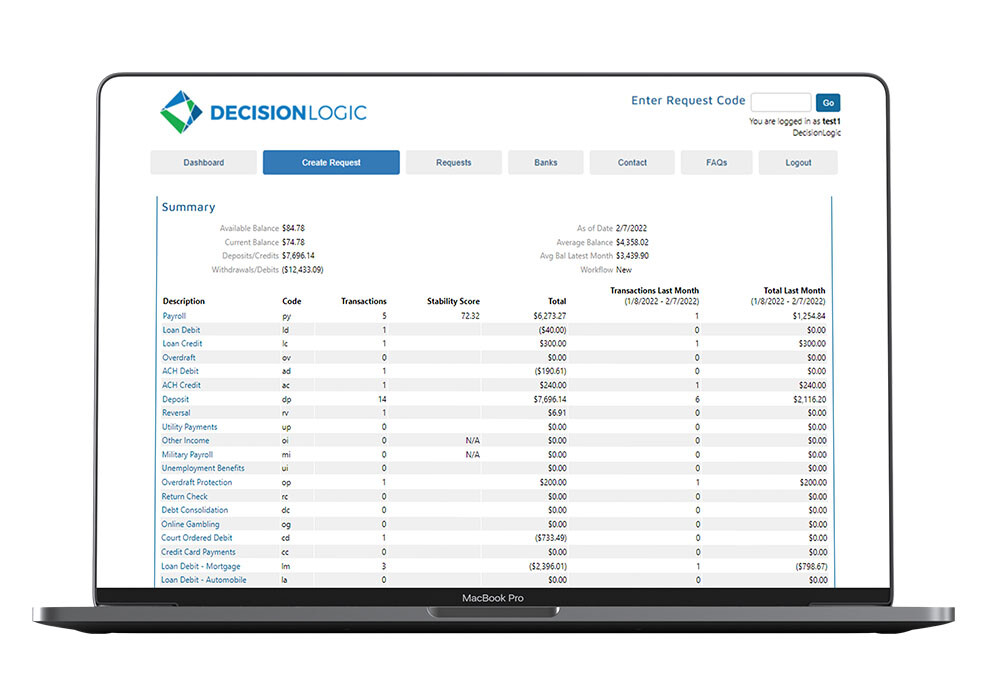
An underwriter needs to understand the story behind those records. A slow month may reflect seasonality. Transfers can inflate deposits without creating new revenue. A recurring debit may be an existing obligation that needs to be considered alongside a proposed payment. A report makes those questions easier to identify; it does not answer all of them on its own.

- Account and ownership details: check that the returned information matches the account and applicant being reviewed.
- Balances and cash-flow patterns: look beyond a single day’s balance and consider the available period.
- Incoming transactions: distinguish operating receipts from transfers, refunds and financing proceeds.
- Outgoing transactions: understand recurring expenses, debt payments and other commitments.
- Missing information: clarify gaps or categorization issues before relying on the report.
A business cash-flow example
Suppose an account shows $40,000 in incoming transactions: $25,000 from customers, $10,000 transferred from another business account and $5,000 from new financing. The $40,000 total is not the same as $40,000 in sales. A reviewer needs to separate the sources and consider the payments attached to that new financing.
This hypothetical example explains why a lender may ask follow-up questions after verification. It is not a customer case or a DecisionLogic scoring formula. These are practical review considerations, not a claim that every institution applies the same underwriting rules.
Is Decision Logic legit and safe to use?
DecisionLogic is a real financial-data service operated by Clarilogic, Inc. It publishes product information, security practices, consumer resources and support channels. That establishes the provider’s identity. It does not establish that every message bearing its name came from a legitimate lender.
If you receive an unexpected link, call the institution using a number from your existing records or its verified website. Confirm the application and the reason for the request before entering information. A familiar logo alone is not enough.

How DecisionLogic made sharing bank information safer
In some older business-funding workflows, funders asked applicants for a month-to-date (MTD) screenshot or required a manual bank-login call with an underwriter. The goal was to check recent account activity and confirm that the statements submitted during underwriting were authentic. In a manual-login call, the applicant gave the underwriter access to online banking so the underwriter could pull the records and compare them with what had been submitted.
Both methods had drawbacks. A screenshot could be edited, cropped or leave out transactions, so it was not fraud-proof. Letting someone into an online-banking account introduced a different concern: the applicant was giving another person account access to complete what should have been a request for financial records.
DecisionLogic helped make that exchange safer. The applicant completes the verification flow and authorizes the connection, while the requesting bank, funder or other institution receives a read-only report. As DecisionLogic’s borrower FAQ explains, the institution can review the returned information without seeing the applicant’s online-banking login credentials or logging in as the applicant.
For the borrower, this reduces the need to hand account access to a representative. For the underwriter, records obtained from the financial institution provide a stronger basis for checking submitted statements than a screenshot alone. That reduces opportunities to pass off altered screenshots as genuine bank activity. It does not eliminate every form of fraud, and applicants should still verify the requesting institution and understand what information they are authorizing it to receive.
What security protections does DecisionLogic describe?
Its security page describes encryption in transit and at rest, role-based access controls, security testing and employee security training. These are the provider’s published practices, not an independent security audit by Excel Capital. No bank-data service can promise zero risk.
According to DecisionLogic’s borrower FAQ, neither DecisionLogic nor the requesting lender sees or stores your online-banking login credentials. This is the provider’s statement about credentials, not a claim that no financial data is retained. An institution can still receive and retain a report under the applicable terms.
What can an institution see?
Depending on the bank connection, the products used and your authorization, the returned information can include account identifiers and ownership details, balances, transaction records and derived summaries. Read the request rather than assuming it shares only your current balance.
Four things that should not be confused
- Banking credentials
- The information used to authenticate. DecisionLogic’s FAQ says the provider and lender cannot see these credentials.
- Financial records
- The account information and activity returned through an authorized connection. A read-only report still contains sensitive information.
- Refresh access
- An enabled feature can retrieve newer available data without another borrower interaction. Ask about scope, duration and how to stop access.
- Payment authorization
- Permission to debit an account is a separate matter. A verification report alone does not establish that you agreed to a payment.
Read the verification consent and any separate financing or payment agreement. Sources: FAQ, Refresh product description and service terms.
Can the institution check the account again?
DecisionLogic advertises a Refresh feature for obtaining newer available data without another borrower interaction. Do not assume that completing a single link means access can happen only once. Ask the institution which permissions apply to your request, whether ongoing access is enabled and how you can withdraw that permission.
Disconnecting a connection and deleting information already received are different actions. For questions about a DecisionLogic report, access, disputes or deletion requests, start with its consumer information page and the requesting institution. DecisionLogic’s website privacy policy has scope limitations, so the terms and notices associated with the actual service also matter.
Does DecisionLogic let someone withdraw money?
Its published verification process gives the institution a read-only bank report. Reviewing that report is different from initiating a debit. If a lender also asks you to authorize payments, read that separate authorization and repayment agreement carefully. Ask the institution to explain any wording you do not understand before agreeing.
DecisionLogic products and what each means for your application
DecisionLogic offers more than one bank-verification workflow. Its products page groups the core offering into Instant Account Verification, Identity Verification and Summary Analytics. Institutions can add capabilities around those products.
Instant Account Verification (IAV)
IAV is the part most merchants encounter when a lender requests bank information. DecisionLogic describes a blended connection approach using data partners and open-banking APIs. It supplies account and transaction information for the institution’s review. The available records and history depend on the connection and request; there is no reason to assume every bank returns the same period or fields.
Identity Verification (IDV) and DL Match
DecisionLogic’s DL Match identity-verification tool is powered by Experian. It checks key personal information and flags risk factors. This is distinct from signing in to a bank account. An institution decides whether to use it. A DecisionLogic bank request does not automatically mean you will be asked for a selfie or a document upload.
Summary Analytics and Income Stability Score
Summary Analytics categorizes income and expenses and applies proprietary scoring to highlight patterns. The separately listed Income Stability Score draws on available account data to assess payroll and income patterns. It is a provider-specific measure, not a FICO score or a universal loan-approval threshold. Consumer payroll patterns also need different interpretation from a business’s revenue.
Refresh, portal access and integrations
Refresh retrieves newer available data without another borrower interaction, subject to the applicable connection and authorization. Portal access gives institutions a way to manage requests without building a custom integration. Integration and automation options include APIs, custom rules and automated workflows that institutions can configure around their review process.
What you do, and what the institution may use
Some products operate behind the scenes. They are not all separate steps for the merchant.
Institution tool: IAV through a portal or integrated workflow.
Purpose: Receive available bank information for review.
Institution tool: IDV.
Purpose: Validate personal information separately from the bank connection.
Institution tool: Summary Analytics and relevant scores.
Purpose: Interpret transactions and investigate patterns.
Institution tool: Refresh or monitoring features, if enabled.
Purpose: Review newer information under the applicable authorization.
Excel Capital does not claim to use every product shown. The requesting institution determines its own setup.
Other named offerings and support features
DecisionLogic also promotes DL NextCheck for automated refresh and monitoring. Its NextCheck overview describes using updated account information throughout the lending process. The provider also advertises a First Payment Default Score on its homepage and DL Precision Engine as an automated-decisioning offering that does not require an integration. Institutions should confirm the available scoring, decisioning capabilities and terms directly with DecisionLogic for their intended use.
The products page lists live support, free workflow reviews, free integration and support, unlimited free training, and no contracts or monthly minimums. Its process overview also describes ongoing support for institutions and their borrowers, with customer and technical support included at no extra charge. These are the provider’s advertised service features; they do not mean every report or product is free. Institutions should confirm current pricing and what is included.
Decision Logic reviews: benefits, limitations, and our assessment
Our assessment focuses on what a business owner needs to understand before completing a request. Excel Capital facilitates DecisionLogic requests for institutions that use it. We are not presenting this article as an independent technical audit or a test of every DecisionLogic product.
Where it can help
- A clearer document exchange: an authorized bank connection can give an institution structured records to review.
- Less manual statement handling: available bank data can reduce the back-and-forth involved in collecting records.
- A more organized review: transaction categories and summaries can help an institution identify questions earlier.
Where friction remains
- Bank connections can fail: access, authentication or connection issues can interrupt the process.
- Permissions deserve attention: a quick connection can still involve substantial financial information or continuing access.
- Reports need interpretation: categorization and balances cannot explain every business circumstance.
- Verification is not approval: a completed request does not settle the lender’s remaining requirements.
Third-party review sources
When checked on October 17, 2026, DecisionLogic’s BBB profile listed accreditation and an A+ business rating. A BBB rating is different from an average customer star rating and is not a technical security assessment. You can use the profile to examine the company’s identity and any available customer reviews or complaints.
DecisionLogic’s G2 profile provides feedback about the financial-data product. Look at the reviewer’s role, review date and number of reviews before drawing a conclusion. An institution user’s experience can help explain the reporting tools, but it does not predict a merchant’s loan outcome.
Reading reviews of lenders that use DecisionLogic
Separate a complaint about connecting a bank account from a complaint about a lender’s rate, approval decision or funding delay. They concern different parts of the experience. When reading third-party reviews, check the company name, website, date and whether the reviewer describes the bank-verification service. Search results also include restaurant software and employer reviews with similar names.
For merchants, the useful question is whether the requesting institution has explained the purpose, permissions and next steps clearly. For institutions, evaluate bank coverage for your applicants, data quality, support, consent handling and integration fit. A generic star rating cannot answer those questions for your particular workflow.
DecisionLogic vs. Plaid and other bank-verification platforms
DecisionLogic is not the only platform that can connect to bank information. Plaid and Mastercard’s open-finance services are other examples. Products, connections, data access and institution workflows differ, so it is misleading to call one service the only secure way to verify a bank account.
Our Plaid review and bank-verification walkthrough explains the provider Excel Capital uses directly. Our Plaid safety guide looks more closely at its permissions and security questions. Mastercard describes its own options in its small-business open-finance overview.
For an existing application, use the verification method requested by the institution. You generally cannot replace a DecisionLogic request with a Plaid connection on your own. Ask whether an alternative is available if you are uncomfortable connecting or your bank is not supported.
Decision Logic not working? Where to start
A failed connection does not tell you whether your application qualifies for financing. First identify where the process stopped, then contact the party that can resolve that step.
Match the problem to the next step
- No link, wrong request or expired link
- Ask the requesting institution to confirm the application and send a replacement link.
- Bank sign-in does not work
- Check your access on the bank’s own website. Resolve a locked account or password problem with the bank.
- Security code does not arrive
- Check the phone or authentication method registered with your bank. Complete the bank’s security prompt through the connection flow.
- The connection keeps spinning
- DecisionLogic’s FAQ directs users to support if loading continues for more than three minutes. Describe the error without sending passwords.
- Your bank or requested account is unavailable
- Tell the institution what is missing and ask which supported connection or alternative documentation it accepts.
- Verification succeeded, but there is no loan update
- Contact the lender or funding representative. DecisionLogic does not control the application decision or disbursement.
Official help: DecisionLogic FAQ and service status.
DecisionLogic lists (858) 586-0202 and support@decisionlogic.com for support. For an application facilitated by Excel Capital, your funding representative can help identify the requesting institution and next step. Avoid sending account passwords or authentication codes in support messages.
Frequently asked questions
What is Decision Logic bank verification?
It is an authorized connection that supplies bank-account information to a requesting institution. The institution uses the returned records as part of its own review. DecisionLogic is the service provider, not the bank holding your deposits or the lender deciding your application.
Why does a lender want my bank login?
The connection process authenticates access to the account whose records you are authorizing. Follow the verification flow rather than sending credentials to the lender. DecisionLogic’s FAQ says the lender and DecisionLogic cannot see your online-banking login credentials.
How long does DecisionLogic take?
Authentication and data retrieval can complete quickly, but bank security prompts, connectivity and missing information can cause delays. Do not confuse connection time with loan-review or funding time. Ask the institution for its application timeline.
How far back can DecisionLogic see?
The available transaction period depends on the connection and request. Ask the institution which history it needs and check the permissions presented. Older references to 90-day or 365-day products should not be treated as a universal limit for every current request.
Does DecisionLogic check my credit?
Bank verification and a credit-bureau inquiry are different activities. An institution may have separate identity, credit or other application checks. Ask which checks it will perform and review their authorizations. Do not treat a proprietary income score as your credit-bureau score.
Can I use bank statements instead?
Ask the requesting institution. Some may accept an alternative process; others may require a supported electronic verification. Do not assume that emailing a statement completes the existing request.
Can I use DecisionLogic without online banking?
The bank-connection process requires the appropriate access to your account. DecisionLogic’s FAQ directs users without online banking to the lender to discuss another option.
Why am I being asked to verify again?
The institution may need a different account, a new request or newer information. Confirm the reason with your contact. A second request does not, by itself, establish approval or a problem with the application.
Get help with verification or explore business financing
Already completing a request? Contact the institution that sent it. If Excel Capital is helping with your application, contact our team so we can clarify the request and direct you to the right next step.
Still comparing business financing? You can explore funding options with Excel Capital. The appropriate verification process depends on the institution involved. Connecting a bank account does not commit an institution to approve or fund an application.
About this review
Product and process information checked October 17, 2026 against DecisionLogic’s products, walkthrough, FAQ, security information, terms and consumer resources. The four editorial illustrations were created with AI to explain example roles; they do not depict actual clients or staff. The product screens are DecisionLogic’s published examples. Products and connection screens can change.

