

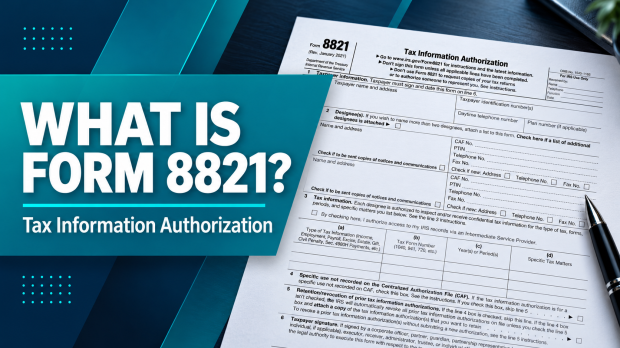
IRS Form 8821, Tax Information Authorization, authorizes a person or organization to inspect or receive your confidential federal tax information for the tax matters and periods you specify. It does not authorize that person or organization to represent you before the IRS.
Download the current IRS Form 8821
Open the official fillable Form 8821 PDF · Read the IRS instructions
Looking for a 2025 or 2026 Form 8821? As of October 15, 2026, the IRS still provides the January 2021 revision. The revision date is not the tax year you authorize. Enter the actual years or periods in line 3.
What is Form 8821 used for?
Form 8821 lets a named person or organization inspect or receive the federal tax information you specify. A business owner might authorize a lender’s tax review, an accountant might need account information, or a taxpayer might want someone to receive copies of IRS notices. The designee, tax matters and periods determine the scope.
How Form 8821 works
- You choose the scopeName the taxpayer and designee. List the tax forms, years or periods and any specific limits.
- You review and signComplete the applicable lines, confirm the disclosure choices and use the signature method required for submission.
- The authorization goes to the IRSUse the appropriate online, fax or mail route. Specific-use authorizations go to the office handling the matter.
- The designee obtains authorized informationThe designee uses the appropriate IRS information-request process. Sending Form 8821 alone does not order a tax return copy or create a lender report.
Form 8821 may be used by lenders and services such as Tax Guard to obtain authorized IRS information. Tax Guard is a private service; Form 8821 is an IRS authorization for federal tax information, not an authorization to access local tax records.
Whether you are a sole proprietor, LLC, S corp or C corp, signing Form 8821 authorizes the named designee to access the information specified on the form. It does not itself request a copy of a filed return; use the appropriate IRS request process, such as Form 4506 for a return copy.
In business lending, this information can help verify an applicant’s federal tax balances and filing history. Form 8821 does not certify that no tax liens or other judgments exist.
Depending on the information the institution needs, specify the tax type, tax form number, and years or periods on Form 8821. Accuracy reviewed October 15, 2026: the IRS form images below show Form 8821 (Rev. January 2021), the latest revision currently provided by the IRS. The PDF links open the official form. Use the current IRS Form 8821 and its official instructions when completing your authorization.
See the current form in the interactive line-by-line guide.
Keep in mind that Form 8821 does not allow a third party to represent you before the IRS. Representation generally requires an eligible representative and a separate power of attorney, usually Form 2848.
Form 8821 offers several useful benefits for business lending institutions, which may request it when underwriting business lines of credit or loans. Requirements depend on the lender and product; the IRS form sets no minimum loan amount.
Form 8821 line-by-line definition tool
Choose a field or select an area of the form to see what it means. You can also read every explanation in the expandable field list. This guide explains the form; it does not collect tax information or submit an authorization.

All 16 field explanations
Form heading: Name and revision
The document is IRS Form 8821, Tax Information Authorization. The January 2021 revision remains the version linked by the IRS as of October 15, 2026. The box marked “For IRS Use Only” is for the IRS.
Check: Use the official PDF linked above; a revision year does not limit which eligible tax periods you may list.
Line 1: Taxpayer name and address
Enter the information for the taxpayer whose records are being authorized, not the lender or accountant. For a corporation or partnership, use its legal name, EIN and business address. Individual, trust, estate and plan taxpayers have their own IRS instructions.
Check: This form does not update your address with the IRS. Joint-return spouses each need a separate authorization.
Line 1: Taxpayer identification number
Use the appropriate taxpayer identification number: an SSN or ITIN for an individual, or the entity’s EIN where applicable. It must identify the taxpayer in line 1.
Check: Do not substitute the owner’s personal tax ID for a separate entity’s EIN. If unsure which taxpayer’s records are needed, confirm before signing.
Line 1: Telephone and plan number
Provide the taxpayer’s daytime telephone number. The plan-number field applies to relevant employee plans; it is not a loan number or an EIN.
Check: The IRS instructions call for a three-digit plan number when applicable.
Line 2: Designee name and address
A designee is the person or organization authorized to inspect or receive your information. Enter the full name and mailing address consistently, plus the requested contact details. Use the additional-designees checkbox and an attachment if naming more than two.
Check: Confirm the actual recipient with your lender or tax professional. Naming a designee does not grant power of attorney.
Line 2: CAF number
CAF means Centralized Authorization File. The nine-digit CAF number identifies the designee in the IRS authorization system; it is not the taxpayer’s EIN. Use the designee’s existing CAF number if one has been assigned.
Check: If no CAF number has been assigned, the IRS instructions say to enter “NONE.” Do not invent a number.
Line 2: PTIN and contact details
PTIN means Preparer Tax Identification Number, an identifier used by paid tax return preparers. It is separate from a CAF number and your taxpayer identification number. Confirm the applicable PTIN and telephone or fax details with the designee.
Check: Use the small “new” boxes when a designee’s address, telephone or fax has changed since the IRS issued the CAF number.
Line 2: Copies of notices
Check the notice-copy box for a designee you want to receive copies of IRS notices and communications for the authorized matters. This choice is separate from authorizing access to the information.
Check: No more than two designees may receive copies for the same matters. Receipt of notices does not give authority to resolve a dispute on your behalf.
Line 3: Intermediate Service Provider
The checkbox authorizes the designee to use a private Intermediate Service Provider to retrieve your IRS records indirectly. Such a provider may supply software or services to retrieve, store and display tax data.
Check: Without this permission, the designee is not authorized to use an Intermediate Service Provider for that retrieval. Ask who the provider is and how it will handle your information.
Line 3(a): Type of tax information
Identify the tax category, such as income or employment/payroll tax, that matches the records being authorized. Special matters such as civil penalties have additional instructions.
Check: Do not write “all taxes.” The category must be specific enough to identify the authorized information.
Line 3(b): Tax form number
Enter the tax-return form associated with that category, for example 1120-S for S corporation income tax information or 941 for quarterly employment tax information when applicable.
Check: Do not put 8821 here just because this is the form you are completing. Column (b) identifies the underlying tax records.
Line 3(c): Years or periods
List the exact tax years or periods. For fiscal years, the IRS instructions use the ending year and month in YYYYMM format. Quarterly periods should be stated clearly.
Check: Do not write “all years” or “all periods.” CAF recording of future periods is limited to three years beyond December 31 of the year the IRS receives the authorization.
Line 3(d): Specific tax matters
Describe a limit if you want to authorize only specific information, such as a balance due, lien information or a particular tax schedule. The IRS instructs you to enter “not applicable” if you are not limiting access within the tax types, forms and periods in columns (a)–(c).
Check: “Not applicable” does not expand the authorization beyond the other columns. Agree on the scope before signing.
Line 4: Specific use not recorded on CAF
Check this box when the authorization is for a specific use that the IRS will not record on CAF. The IRS lists disclosures to loan companies and educational institutions among its examples, along with certain other forms and matters.
Check: For a lender request, confirm the intended authorization and retrieval process. A line 4 specific-use form goes to the IRS office handling the matter, skips line 5 and does not revoke earlier authorizations.
Line 5: Retaining prior authorizations
If line 4 is checked, skip line 5. Otherwise, review whether prior authorizations need to remain in effect. To retain an earlier authorization, check line 5 and attach a copy of the authorization you want to keep, as the IRS directs.
Check: A new authorization generally replaces earlier authorizations for the same tax matters and periods unless retained. Revoking an authorization without a replacement has a separate process described below.
Line 6: Signature, date, name and title
The taxpayer or someone with authority to sign for the taxpayer signs and dates the completed form, prints their name and provides an applicable title. Signing for a business requires authority for that entity and the covered tax matters.
Check: Mail and fax submissions require a handwritten signature. Accepted electronic signatures must use the online submission route. Never sign a blank or incomplete authorization.
Why lenders use Form 8821 for underwriting
A lender may ask for Form 8821 to compare an applicant’s tax information with the loan application and assess obligations that could affect repayment. The review is one part of underwriting, alongside bank statements, financial statements, credit information and the lender’s other requirements.

How lenders use authorized tax information
| Information reviewed | Underwriting question |
|---|---|
| Filed returns and income information | Does the IRS information support the tax returns and income figures provided with the application? |
| Balances, penalties and interest | Are there tax obligations that need to be included when evaluating cash available for loan payments? |
| Missing returns | Is further documentation needed to understand the business’s filing history? |
| Payroll tax records | When authorized, do employment tax filings and payments raise questions about cash flow or compliance? |
| Payment arrangements and collection information | What follow-up is needed to understand current obligations, payment history and potential collection risk? |
Why a tax balance matters to cash flow
For example, a business may show enough cash for a proposed loan payment but also have an IRS installment payment that was omitted from its financial summary. A lender can ask for documentation, include the payment in its analysis, and request an explanation of any mismatch. This is an illustration, not an automatic approval or denial rule.
A tax record is also time-sensitive: a recent payment or return may not yet appear in the information received. The lender may need payment confirmations or updated records to resolve a discrepancy. A tax balance is not the same as a recorded lien, and Form 8821 is not a substitute for a separate lien or judgment search.
What does Tax Guard do, and how does it use Form 8821?
Tax Guard is a private provider of tax information services for lenders. It describes using Form 8821 as part of its process for producing a Tax Guard Report, which can involve business income and payroll tax information. The signed form supplies authorization; Tax Guard’s separate service obtains and organizes information for the lender. Tax Guard’s lender guide.
“Tax Guard form” is sometimes used informally for Form 8821, but the IRS form and the company’s report are different things. Ask the lender which designee will be named, what records are needed, whether any monitoring service is involved, and how the information will be protected. Form 8821 itself does not enroll you in a paid service or promise a particular turnaround time.
What borrowers should confirm before signing
- The lender or service requesting the form is the one you intended to work with.
- The designee and tax periods match the stated purpose of the review.
- You understand the line 3 permission for an Intermediate Service Provider and the line 4 specific-use rules.
- The form is complete, and you have a copy of the signed authorization.
Form 8821 is one way to authorize a third party to review federal tax information. Taxpayers can also obtain their own IRS transcripts; the authorization is not the only way to learn about tax debts.
With the taxpayer’s authorization, IRS records can help lenders review:
- Outstanding tax liabilities
- Missing tax returns
- And federal tax lien information
- For the specific tax matters and years or periods authorized
A public lien search alone does not establish whether all federal taxes have been paid or returns filed. Authorized IRS records can provide additional information to help a lender assess the applicant’s tax history.
Form 8821 can authorize that review, but it does not itself request a transcript or certify tax compliance.
Why File Form 8821?
There are 3 primary benefits to filing Form 8821.
First, a designee can receive copies of IRS notices and communications for authorized tax matters when the appropriate box on line 2 is checked. The IRS permits this for up to two designees; earlier delivery than the taxpayer’s copy is not guaranteed.
This can help you review a client’s notices promptly and discuss potential issues with them. Receiving information does not grant authority to resolve those issues with the IRS on the client’s behalf.
Second, unlike power of attorney, the IRS allows you to list your practice as the appointee on Form 8821.
An organization can be named as the designee, but that does not authorize unrestricted sharing or allow the designee to substitute another party. Confirm which organization is named and how it will handle the authorized information.
Lastly, Form 8821 provides access to specified tax information without granting representation authority. The authorization generally remains in effect until revoked or withdrawn; a new authorization for the same matters and periods generally replaces an earlier one unless it is retained as instructed. See the IRS authorization guidance.
How to fill out Form 8821
How to complete Form 8821: six checks
- Line 1 · Identify the taxpayerMatch the name, address and tax ID to the taxpayer whose records will be disclosed.
- Line 2 · Name the designeeConfirm who may receive the information and whether notice copies are authorized.
- Line 3 · Define the informationList the tax type, form number, periods and specific matters. Review the service-provider checkbox.
- Line 4 · Check specific useDetermine whether the request is a specific use not recorded on the IRS authorization file.
- Line 5 · Review prior authorizationsIf applicable, attach copies of authorizations you want to retain and check the retention box.
- Line 6 · Sign and dateThe taxpayer or authorized signer completes the signature, date, printed name and applicable title.

Complete the form with the taxpayer and the intended recipient so that the information and permissions match the request.
The key areas include taxpayer information, the designee, the tax information authorized, any applicable specific-use or retention choices, and the taxpayer’s signature.
First, Taxpayer information is where the client’s name and information are placed:

If you do not know your business EIN, locate your IRS EIN confirmation or a previously filed tax return. Our Form SS-4 and EIN guide explains where to find it.
Second, once you’ve entered your client’s information, line 2, Designee, is where you enter your information and the information of any additional designees.

Once each party’s basic information is entered, line 3 specifies the tax information the designee may inspect or receive. Form 8821 does not authorize the designee to edit tax returns or make decisions for the taxpayer.

Identify the type of tax, the tax form number, and the specific years or periods for each authorized matter. General entries such as “all taxes” or “all years” are not accepted.
Again, keep in mind that this is a general overview. Also review line 4 for specific-use authorizations, line 5 for retaining a previous authorization, and line 6 for the taxpayer’s signature.
For a detailed explanation of each section, follow the IRS instructions for Form 8821.
Form 8821 line 3 example for a business
Illustrative example only: an S corporation authorizing review of its 2023–2025 income-tax information and its 2025 quarterly payroll-tax information could have separate rows like these. Use only the forms and periods that apply to your business and the agreed request.
| (a) Tax type | (b) Form | (c) Years / periods | (d) Specific matters |
|---|---|---|---|
| Income | 1120-S | 2023 through 2025 | Not applicable, if no further limit is intended |
| Employment | 941 | 1st quarter 2025 through 4th quarter 2025 | Not applicable, if no further limit is intended |
A C corporation, partnership or sole proprietor may use different tax forms. An LLC’s tax classification matters; “LLC” alone does not identify the return to list. Do not copy these years or form numbers into an unrelated authorization.
When to file Form 8821
So, when should you file Form 8821?
There are two primary ways you can do it, each useful depending on your needs and workflow.
First, when access is needed and the client agrees, include the authorization in your client sign-up process. For a nontax purpose such as income verification for lending, the IRS must receive Form 8821 within 120 days of the taxpayer’s signature.
By doing so, it’s much easier because you won’t have to circle back around later and request they fill out an additional document which can lead to questions.
Second, review the authorization’s scope with your client when preparing their annual return. A new Form 8821 is not automatically required each year, but may be needed to authorize additional periods or a different designee.
Form 8821 is a simple and straightforward tool for obtaining your client’s tax information.
Before filing, confirm that the client agrees to the named designees and the specific information being disclosed. Request notice copies on line 2 when appropriate; Form 8821 does not guarantee notification of every tax problem.
Where to file Form 8821: online, fax or mail
First check line 4. A specific-use authorization goes to the IRS office handling that matter. For other Form 8821 submissions, use one of the following routes:
- Online: use the IRS Submit Forms 2848 and 8821 Online service. It accepts completed forms with handwritten or accepted electronic signatures. Follow the identity-verification and attachment requirements on the IRS page.
- Fax: use the number that matches the taxpayer’s location in the IRS Where To File chart. Mail and fax forms require a handwritten signature.
- Mail: use the corresponding IRS address in that same chart. Check the current chart before sending; routing information can change.
If you already faxed or mailed the form, the IRS says not to submit the same form again through the online tool. An online receipt confirms submission, not completed processing. Use the status link on the IRS submission page for current processing information.
When does the 120-day rule apply?
For a nontax purpose such as lender income verification, the IRS must receive Form 8821 within 120 days of the taxpayer’s signature. This is a submission deadline, not a rule that the authorization expires 120 days after signing. The requirement does not apply to an authorization submitted to assist with a tax matter before the IRS.
Form 8821 vs. 2848, 4506-T and 4506-C
| Form | Main purpose | What to remember |
|---|---|---|
| 8821 | Authorizes a named designee to inspect or receive specified tax information. | Does not give power of attorney or itself order a return copy. |
| 2848 | Authorizes an eligible individual to represent you before the IRS for specified matters. | Use when representation is needed, subject to its limits and requirements. |
| 4506-T | Requests a transcript of tax return or account information. | A transcript is different from a photocopy of the filed return. |
| 4506-C | Requests tax transcripts through the IRS Income Verification Express Service (IVES). | Often part of a lender’s transcript-verification process, with taxpayer consent. |
For a copy of an actual filed return, see Form 4506. Ask your lender which document and process it requires; Form 8821 is not a universal replacement for Form 4506-C or a loan program’s documentation rules.
Form 8821 questions borrowers ask
Is the 8821 form the same as the IRS 8821 tax form?
Yes. These names refer to IRS Form 8821, officially titled Tax Information Authorization. Check the form number and title when a lender asks for an IRS 8821 form, since other IRS forms grant different permissions or request different records.
Is Form 8821 a power of attorney?
No. It permits specified information access. It does not authorize the designee to advocate your tax position, sign agreements for you or otherwise represent you before the IRS. Representation generally uses Form 2848 and an eligible representative.
Is it safe to sign Form 8821 for a lender?
It is an IRS authorization to disclose confidential tax information, so review the completed form and verify the recipient before signing. Confirm the tax periods, any specific limits, notice-copy choices and service-provider permission. Do not sign a blank form. The authorization does not give the designee access to your bank account or permission to receive your tax refund.
Does signing Form 8821 hurt my credit or guarantee a loan?
Form 8821 authorizes IRS information access; it is not a credit-bureau inquiry authorization or a lending decision. A lender may separately request permission to check credit. Information obtained during tax review can affect underwriting, but the form itself does not approve or deny financing.
How long is Form 8821 valid?
The IRS says a tax information authorization remains effective until it is revoked or withdrawn. A new authorization for the same matters and periods generally replaces a prior one unless retained as instructed. The 120-day lender rule concerns when the IRS receives the signed form, not automatic expiration. A lender may have its own requirements for a recent signature.
How do I revoke Form 8821?
If you have the authorization, write “REVOKE” across its top and add a current taxpayer signature and date below the original signature. Follow the submission directions in the line 5 IRS instructions. Without a copy, those instructions explain the signed statement identifying the designee, tax matters and periods. Send a specific-use revocation to the IRS office handling that matter.
Can I use Form 8821 for a business, an LLC or an SBA loan?
It can authorize applicable business tax information, including information requested during lending. Identify the correct taxpayer and underlying return forms; an LLC’s federal tax classification affects those entries. For an SBA or other loan, follow the lender’s program requirements and confirm whether it needs Form 8821, an IVES authorization or other documents.
Do both spouses sign one Form 8821?
No. For a joint return, each spouse who wants to authorize disclosure must complete a separate Form 8821. One spouse’s authorization does not designate a recipient on behalf of the other spouse.
Can I get my own IRS transcripts instead?
You can use the IRS tax transcript options to obtain your own available records. Ask the lender whether borrower-provided transcripts satisfy its verification requirements before substituting them for its requested authorization.
Sources and related business documents
Form revision, completion and filing guidance checked October 15, 2026 against the IRS Form 8821 page, official instructions, online submission guidance and IRS authorization guidance. Lender-service context: Tax Guard’s explanation of its Form 8821 process.
Need to locate your business tax ID? Use our SS-4, CP575 and EIN confirmation field guide. For business tax classification, see S corporation vs. C corporation.

